
Stepping into Rank Math for the first time is like entering a high-tech cockpit. It’s immensely powerful, but the sheer array of toggles and tools can feel overwhelming. If you’re staring at the dashboard wondering where to begin, take a breath—you’re in the right place. You are joining millions of creators who have traded “basic” SEO for a precision-engineered powerhouse.
Table of Contents
- The Pre-Flight Checklist – Essential SEO Architecture
- Account Authentication & Protocol
- Account Architecture – Your Data Command Center
- Goal Calibration – Aligning Analytics with Strategic Objectives
- Stream Configuration – Connecting Your Domain
- Final Verification – The “Pending” Milestone
- Awakening the Engine – Installing the Rank Math SEO Suite
- System Sync – Authenticating Your Rank Math Account
- Secure Sync – Finalizing the Rank Math Integration
- Finalizing the Bridge – Domain Activation
- Choosing Your Path – The Rank Math Setup Wizard
- Initiating the Advanced Framework
- Defining Your Identity – The “Your Site” Configuration
- Integrating Insights – The Analytics Synchronization
- Authorizing the Google Connection
- Forging the Data Link – Finalizing Google Authentication
- Dashboard Integration – Linking Your Search Console Data
- Traffic Calibration – Mapping Your GA4 Properties
- Revenue Integration – The AdSense Module
- Content Blueprinting – The Sitemaps Configuration
- Technical Precision – The SEO Optimization Tweaks
- The Finish Line – Your Site is SEO-Ready!
- Access Control – The Role Manager
- Eliminating Dead Ends – 404 Monitor & Redirections
- Contextual Clarity – Schema Markup
- Mastering Redirections – Keeping Your Site Error-Free
- Speed to Market – Setting Up Instant Indexing
- AI Visibility – Setting Up LLMS (Large Language Model Signals)
- Bridging the SEO Gap – The ACF Module
- Dominating Local Search – Setting Up Local SEO
- Customizing Your Setup – Activating Specialized Modules
- Turning Strategy into Action – Optimizing Your Content
- Design & Data – Opening the Rank Math SEO Panel in the Classic Editor
- Design & Data – Accessing Rank Math in the Classic Editor
- Mastering the SEO Checklist in the Classic Editor
- Advanced Schema & Metadata in the Classic Editor
- Global Metadata & Indexing Controls
- Contextual Clarity – Mastering Schema Markup
- Unlocking Growth – Rank Math SEO PRO Features
- Contextual Dominance – Multi-Schema & Specialized Sitemaps
- Specialized Sitemaps for Niche Visibility
- Optimizing with Content AI Credits
- Strategic Insight – Google Trends Integration
- Data Mastery – Advanced Rank Tracking
- Advanced Analytics & Index Status Monitoring
- Pro Advantages – Automation & Technical Edge
- Ready to Upgrade?
- The Ultimate Comparison – Rank Math Free vs. PRO
- The Ultimate Showdown – Why Rank Math Outshines the Competition
- Conclusion: Your Path to Search Mastery
The Great Plugin Disruption: Why the Old Guard Fell
For years, the WordPress SEO market was a stagnant two-horse race. That era is over. As of 2026, Rank Math has officially surpassed the 3 million active installation milestone, cementing its position as the gold standard for modern webmasters.
This isn’t just a popularity spike; it’s a philosophical shift. In today’s landscape, “basic” tools no longer cut it. Users now demand integrated AI, sophisticated Schema, and deep analytics—all without the “plugin bloat” of the past. Rank Math has delivered exactly that, leapfrogging legacy competitors by offering a “Swiss Army Knife” of SEO.
The “Value Gap”: Why Migration is No Longer Optional
The industry-wide migration to Rank Math is driven by a focus on extreme value. When you look at the feature-to-price ratio, the gap is undeniable:
- The “Pro” Features for Free: Rank Math provides a built-in 404 monitor, Redirection manager, and Schema generator for free—features that competitors often lock behind a $100+/year paywall.
- Scalability Without the Penalty: While other plugins punish success with “per-site” billing, Rank Math’s flexible licensing remains a favorite for agencies and portfolio owners.
The Roadmap: Your Blueprint for SEO Dominance
Your SEO foundation determines your traffic trajectory for years to come. This guide isn’t a simple “how-to”—it’s a comprehensive blueprint designed to take you from a blank slate to a fully optimized SEO engine.
In the chapters ahead, we will master:
- Precision Engineering: Navigating the Setup Wizard for a flawless foundation.
- Strategic Module Deployment: High-speed optimization via selective feature toggling.
- The AI-First Workflow: Harmonizing human-centric writing with 2026 algorithms.
- The ROI of Pro: A transparent analysis of whether the Premium investment fits your specific niche.
Your journey to becoming a search engine favorite starts here. Let’s dive into the core configuration.
The Pre-Flight Checklist – Essential SEO Architecture
Before toggling a single switch, we must establish the “ground rules.” Many SEO campaigns fail not because of the tool, but because the environment isn’t optimized. Here is your essential preparation before hitting “Activate.”
1. The Ecosystem: Self-Hosted vs. Managed
This guide is built specifically for WordPress.org (Self-Hosted). While they share a name, the distinction is vital:
- WordPress.org (The Homeowner): You have total freedom to install Rank Math’s advanced modules, AI features, and custom Schema.
- WordPress.com (The Tenant): This is a restricted environment. Unless you are on a high-tier Business plan, you are generally prevented from installing third-party SEO plugins like Rank Math.
2. The “Slow SEO” Philosophy
Rank Math is an enterprise-level SEO department condensed into a single plugin. It is easy to hit “settings fatigue,” but precision beats speed every time.
Pro Tip: Treat this as a living manual. Do not rush the Setup Wizard; rushing is how users accidentally “no-index” vital pages. Apply one section, verify the results, and then move to the next.
3. Full Transparency
This guide contains affiliate links for Rank Math. If you choose to upgrade to a PRO license through my links, I may earn a commission at no extra cost to you. This support allows me to produce these deep-dive tutorials. I only recommend tools that power my own high-traffic sites, and Rank Math currently sits at the top of that list.
4. The Version Strategy
We will focus on the Free Version for this walkthrough. You shouldn’t pay for a tool until you’ve mastered its core mechanics. If you already own Rank Math PRO, don’t worry—the foundation is identical; PRO simply unlocks more advanced “rooms” in the same house we are about to build.
Before adjusting technical levers, you need “radar.” Google Analytics 4 (GA4) maps your visitor’s journey, identifying where they come from and how they convert.
Rank Math’s native integration pulls this data into your WordPress dashboard, allowing you to make high-level SEO decisions without switching tabs.
Navigating the Ecosystem
First, you must create a “Property” in Google Analytics—a digital container for your site’s data. This ensures:
- Consistency: One Property tracks your entire domain.
- Accuracy: GA4 uses Google’s latest 2026 event-based tracking model.
- Connectivity: Once live, Rank Math “handshakes” with Google to show traffic stats alongside your SEO scores.
Account Authentication & Protocol
1. Authentication & Global Access
Start at analytics.google.com. Use the same Google credentials as your Search Console; this shared identity ensures seamless cross-platform communication. If you’re new, Google will launch an onboarding path to “handshake” your domain with its servers.
2. Initiating the Measurement Protocol
Click “Start Measuring” to begin. Here, you’ll name your account (e.g., your site name) and set data-sharing preferences. This establishes the formal link between your traffic and Google’s processing engine.
3. Mastering the Native Interface
While Rank Math simplifies daily monitoring, the native GA4 dashboard offers professional-level control:
- Audit Live Traffic: Use “Real-Time” reports to verify your Rank Math setup is active.
- Behavioral Nuances: Analyze demographics and retention rates beyond basic SEO metrics.
- Secure Delegation: Manage user permissions for team members without sharing your main password.
By initiating this setup now, you transition from “gut feeling” to a data-informed SEO strategy.

Account Architecture – Your Data Command Center
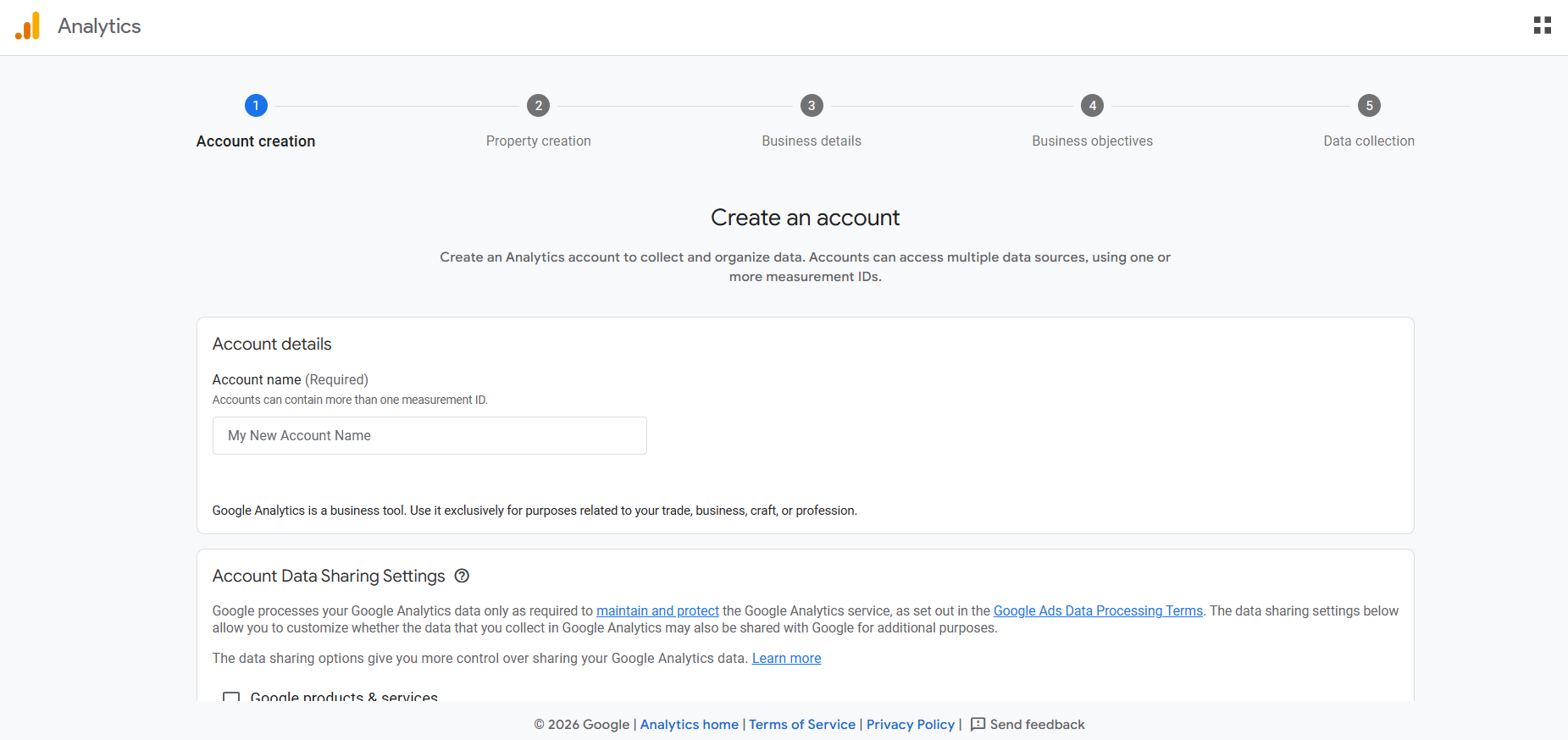
After initiating setup, the first interface you encounter is Account Creation. Think of the “Account” as your master folder—the primary administrative layer that houses data for your current website and any future projects.
1. Strategic Account Naming
The “Account Name” is vital for internal organization. While it doesn’t impact public SEO, a clear naming convention prevents confusion as your portfolio scales.
- Brand Specific: Use the official name of your current blog or publication.
- Domain Centric: Use your registered URL for instant identification in a list.
- Portfolio Branding: Use a broader “Project” or company name if you plan to manage multiple niche sites under one umbrella.
2. Data Sharing & Privacy Protocols
Beneath the naming section, Google provides Data Sharing Settings. these define how your interaction data moves within the Google ecosystem.
- Privacy Alignment: Evaluate these against your personal or business privacy standards to ensure they meet your specific data policies.
- Total Autonomy: These settings are non-critical to Rank Math’s core performance. You can enable or disable them based on preference without degrading the quality of your SEO tracking.
3. Finalizing the Administrative Foundation
Once you have named the account and audited the sharing preferences, click “Next.” This action solidifies your administrative base and transitions you into the technical phase: creating the Property. This is where the actual connection between your Rank Math dashboard and your live traffic begins to take shape.
Goal Calibration – Aligning Analytics with Strategic Objectives
Your selections at the Business Objectives stage are pivotal; they dictate how GA4 personalizes your reporting suite and which data-driven insights it prioritizes.
1. Navigating Your Measurement Framework
Select the goals that mirror your website’s core mission to ensure your data is actionable:
- Lead Generation: Ideal for tracking form submissions or quote requests.
- Sales Optimization: Essential for monitoring e-commerce and financial transactions.
- Brand Awareness: Focuses on visitor volume and identifying growth channels.
- User Engagement: Analyzes how deeply visitors interact with and return to your content.
- Custom Objectives: A flexible option for unique, non-standard goals.
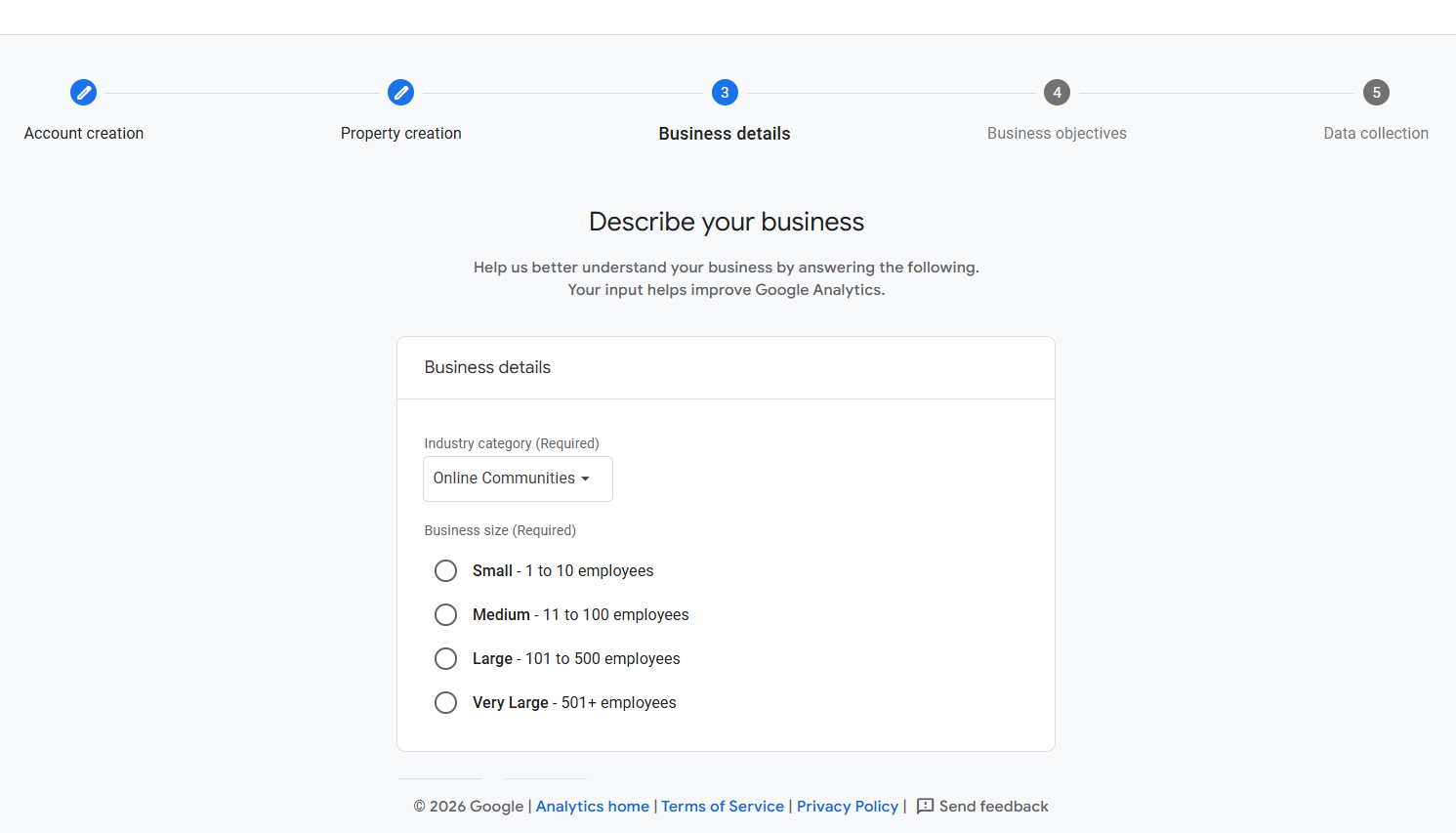
2. Selecting the Ideal Configuration for Your Niche
While you can select multiple goals, focusing on the two most relevant objectives creates a cleaner dashboard:
- Content Creators: Use Traffic Analysis and User Engagement to prioritize readership patterns and dwell time.
- Service Providers: Focus on Lead Generation to highlight inquiries.
- E-commerce: Drive Sales is non-negotiable for tracking revenue and purchase funnels.
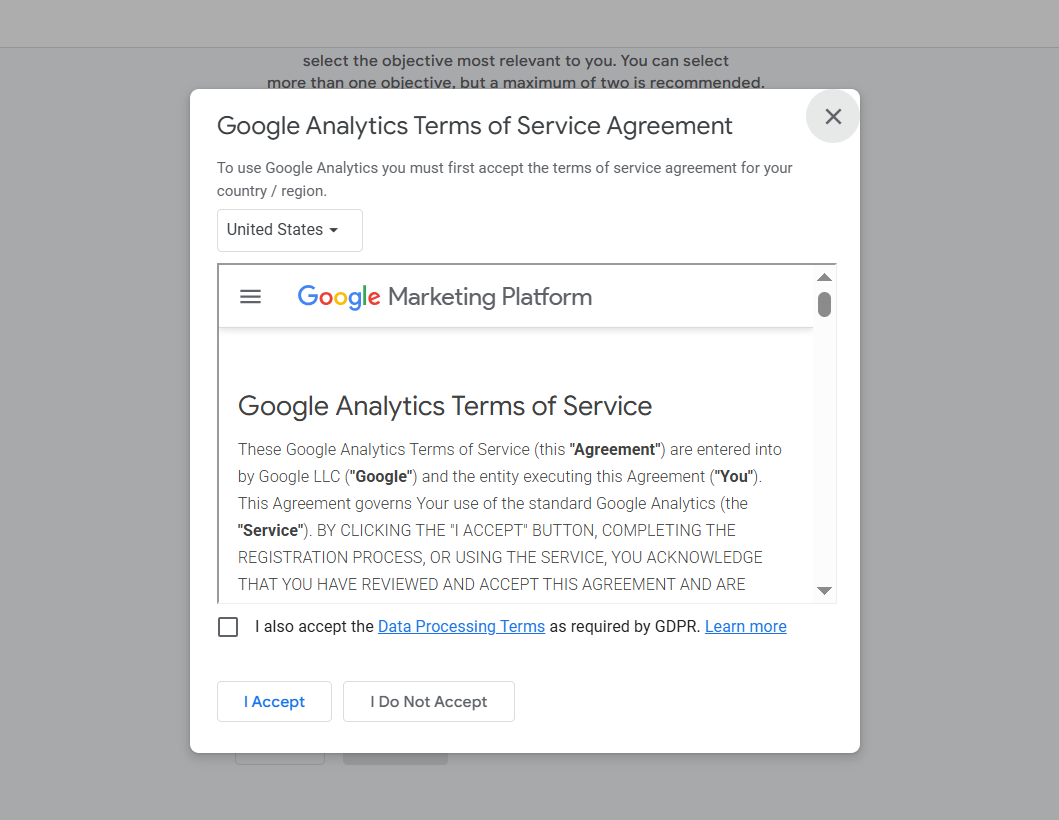
3. The Legal Handshake: Terms of Service
The final step to activate data processing is the Terms of Service agreement:
- Select your country to align with local data regulations.
- Check the consent box to authorize handling.
- Click “I Accept” to finalize the legal setup.
Stream Configuration – Connecting Your Domain
With the administrative work finished, it’s time to configure your Data Collection source.
Platform Selection
In the “Choose a Platform” interface, you will see options for iOS, Android, and Web. Since we are optimizing a WordPress site, select “Web.” This instructs Google to prepare its servers for incoming data from your specific domain.
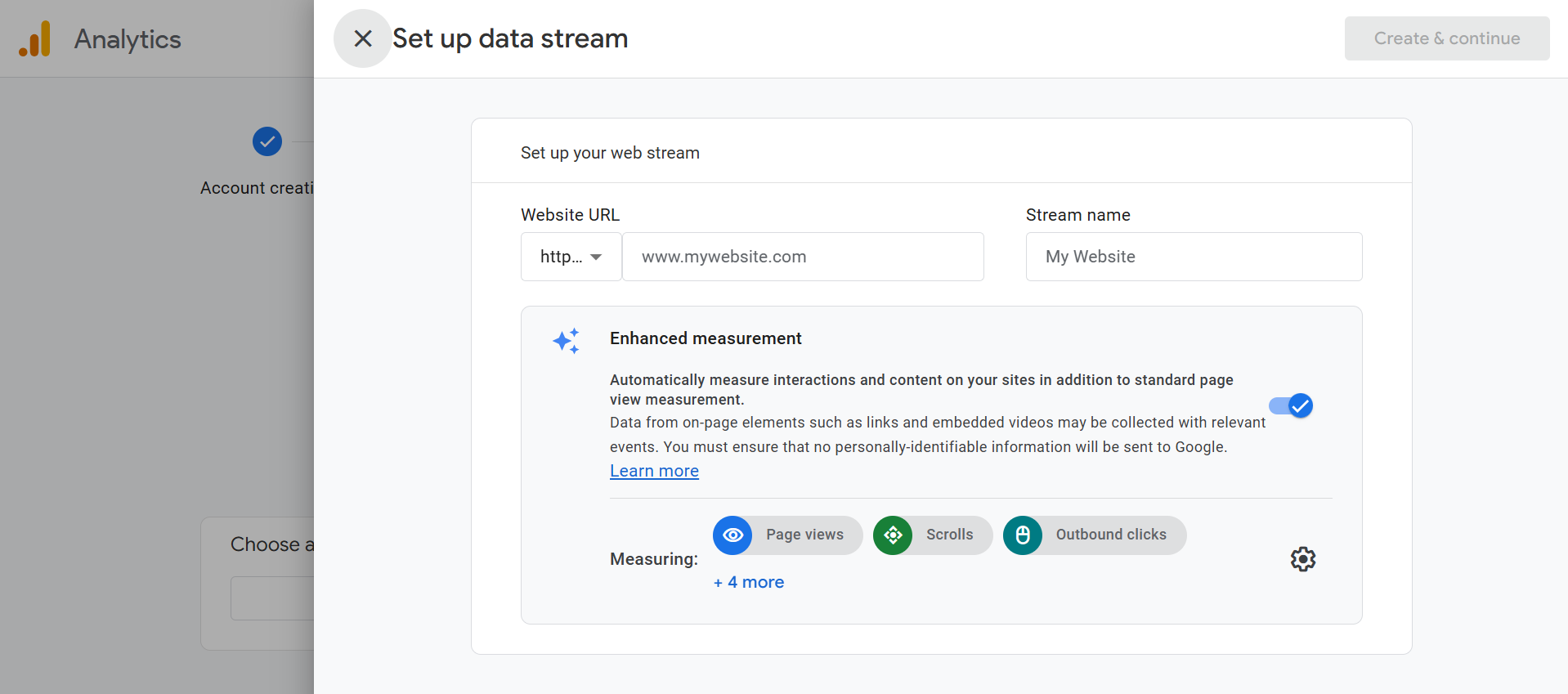
Establishing the Web Stream
Here, you will formally link your site to the GA4 engine:
- Website URL: Enter your primary domain address.
- Stream Name: Use your blog’s title or a recognizable name for easy identification.
- Create & Continue: Click this to solidify the connection.
The Rank Math Advantage: Bypassing Manual Code
Shortly after, a “Set up a Google tag” window will appear with snippets of code. You can safely click the “X” to dismiss this. One of the most powerful features of Rank Math is its ability to handle this technical heavy lifting. You do not need to manually paste code into your website headers; Rank Math will automate this integration in the next phase of our setup.
Auditing the Web Stream Details
The “Web Stream Details” window will display your Measurement ID and technical specifications. While this is the “DNA” of your tracking connection, you don’t need to record it manually. Rank Math will bridge this gap for you. Simply close this window to proceed.
Final Verification – The “Pending” Milestone
You will now see your website URL in the Data Collection list—a visual confirmation that your property is live. After verifying that the URL is correct, click “Next.”
The “Data Collection is Pending” Status
The final screen will notify you that data collection is “pending.” Do not let this alarm you; it is a standard part of the GA4 rollout. Google typically requires 24 to 48 hours to process and display initial traffic activity once your site starts receiving visitors.
At this point, your work within the Google Analytics interface is complete. You can safely close the tab and return to the WordPress dashboard. We are now ready to perform the final, seamless integration using the Rank Math Setup Wizard.
Awakening the Engine – Installing the Rank Math SEO Suite
With your Google Analytics architecture finalized, it’s time to return to WordPress and activate the core engine of your SEO strategy. The installation is engineered for efficiency and integrates seamlessly in just a few clicks.
1. Navigating the Plugin Repository
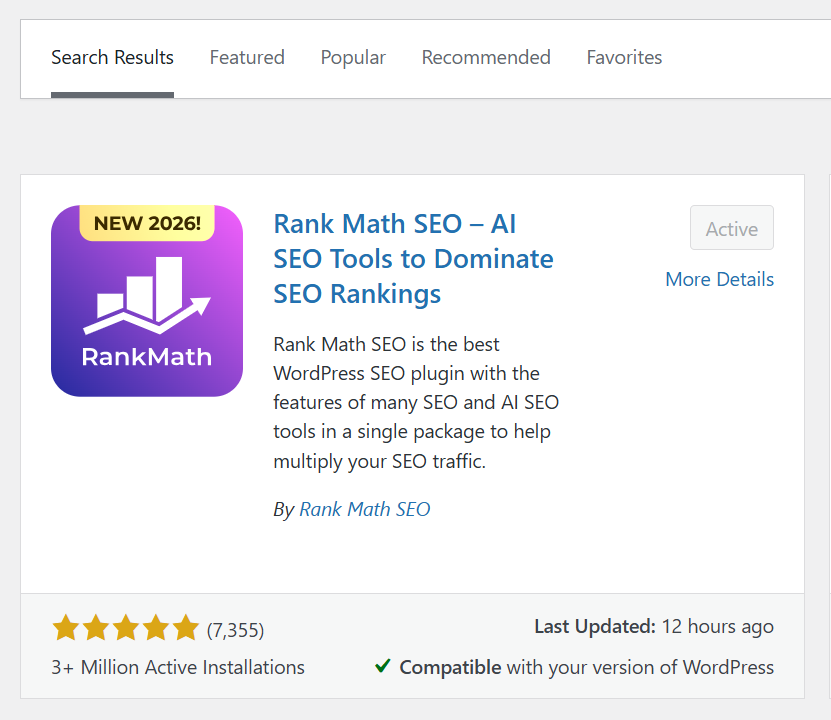
From your WordPress sidebar, head to Plugins > Add New Plugin. This is the secure gateway to the official repository, ensuring you add vetted, high-quality functionality to your site.
2. Executing the Global Search
Type “Rank Math” into the search bar. The plugin will appear as the primary result—distinguishable by its signature purple branding and thousands of five-star reviews.
3. Installation & Technical Deployment
Click “Install Now.” WordPress will download the necessary files and prepare them for your specific server environment. This background process typically completes in a few seconds.
4. Activation & Triggering the Wizard
Once installed, click the vibrant blue “Activate” button. This transitions Rank Math from a stored file into a functional part of your website’s DNA, immediately launching the Setup Wizard to begin your configuration.
Activating the plugin does more than just add a menu item; it typically triggers the Rank Math Setup Wizard immediately. This intelligent onboarding process is designed to walk you through the precise configuration steps required to ensure your site is technically sound and fully optimized for 2026 search algorithms.
System Sync – Authenticating Your Rank Math Account
Linking your site to the Rank Math ecosystem transforms the plugin from a static tool into a live, data-driven assistant.
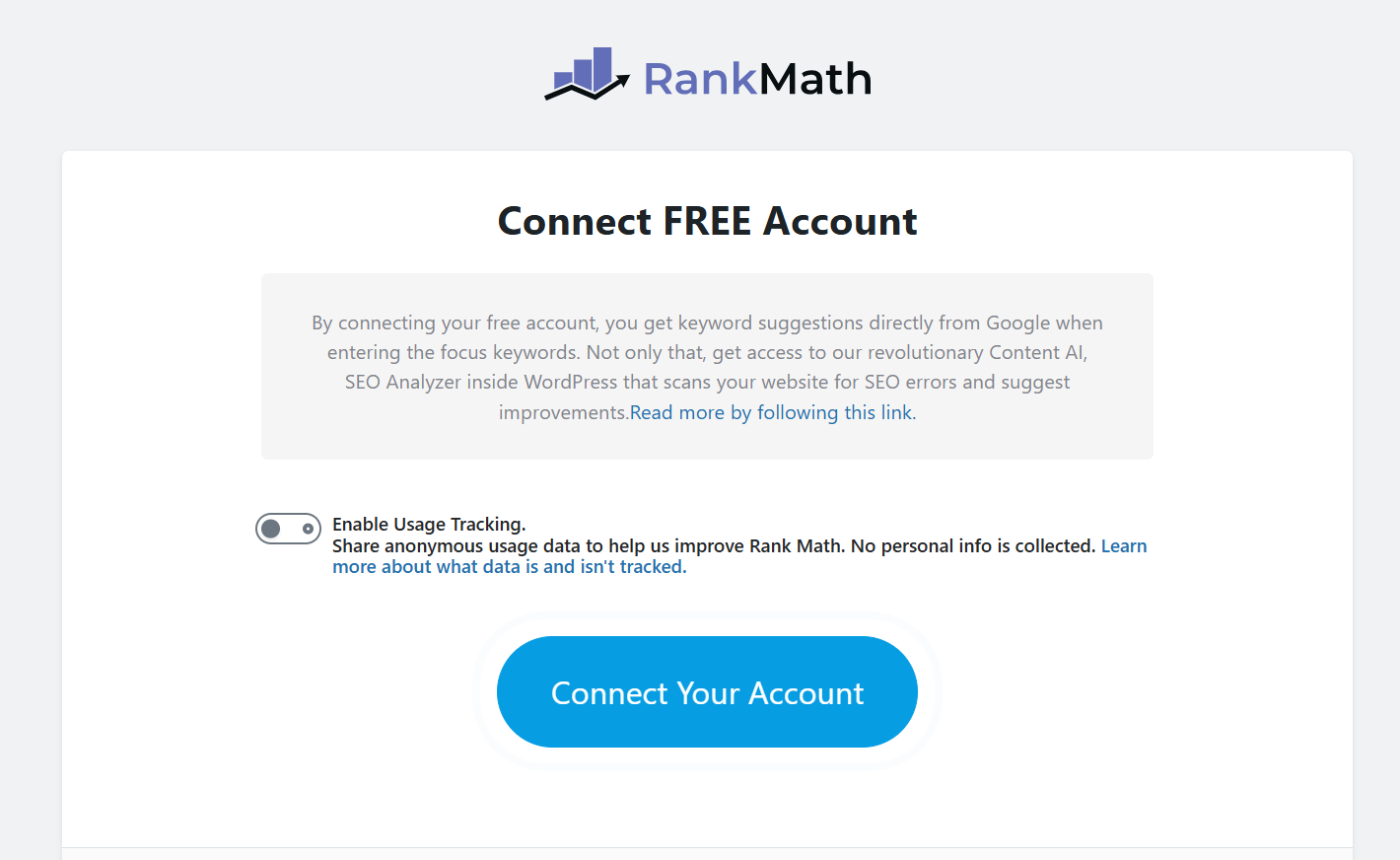
1. Accessing the Portal
The “Connect Free Account” screen usually appears after activation. If not, go to Rank Math SEO > Dashboard to trigger it manually.
2. Why Connection is Essential
A connected account unlocks a high-performance 2026 workflow:
- Data Bridging: Imports GA4 and Search Console insights into your WordPress dashboard.
- Content AI: Enables real-time writing suggestions and keyword density analysis.
- Advanced Modules: Activates the 404 Monitor, Redirection Manager, and Schema Generator.
- AI-Era Tracking: Powers tools like the llms.txt generator to ensure your content is indexed by AI search engines.
3. Activating the Link
Click “Connect Your Account” to start authentication. You’ll sign in via Google, Facebook, or Email at the Rank Math portal. This ensures your site receives the latest 2026 security patches and SEO signal updates automatically.
Secure Sync – Finalizing the Rank Math Integration
Clicking the connect button bridges your local installation with Rank Math’s global infrastructure. This authentication is the final requirement for enabling real-time SEO data and AI-driven insights.
1. Authenticating Existing Profiles
If you already have a Rank Math account, simply enter your credentials. The system will instantly recognize your domain and link it to your profile, maintaining continuity across your site portfolio.
2. New User Onboarding
If you are new to the platform, select “Register Now.” Rank Math offers several frictionless paths for account creation:
- Social Logins: One-click setup via Google or Facebook.
- Ecosystem Linking: Direct connection through your WordPress.com profile.
- Direct Registration: Standard email and password setup.
3. Granting Permissions
Once you choose a method, you must authorize the connection. This “handshake” allows the plugin to verify your site and activates high-level features like automated keyword suggestions and cloud-based SEO audits that require a secure connection to Rank Math’s servers.
Finalizing the Bridge – Domain Activation
The authentication summary confirms your site is now linked. Even the Free tier is a powerhouse, providing the technical framework—Sitemaps, Schema, and Content Analysis—that usually requires multiple premium plugins to replicate.
1. The Strategy: Starting Strong for Free
While the Pro version adds advanced AI tracking and multi-location SEO, the version you are activating now is more than enough for most growth-focused blogs. It ensures your content is indexed correctly and optimized for 2026 search signals.
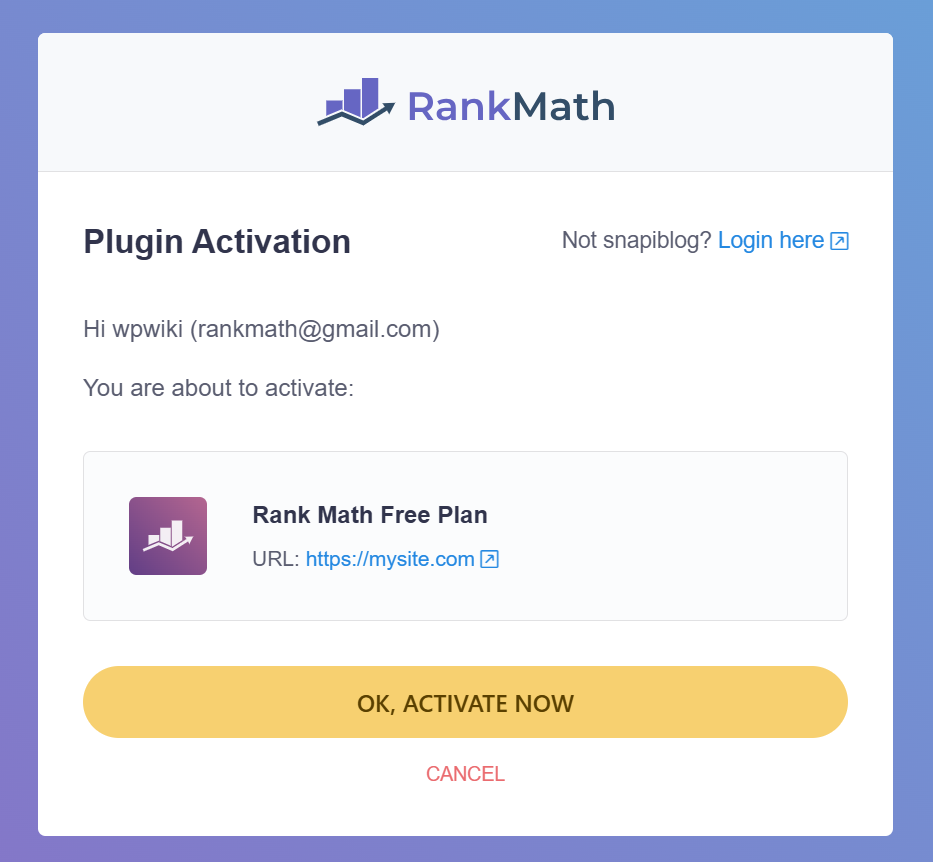
2. Executing the Activation
Click “OK, Activate Now” to key the plugin to your domain. This step is critical for:
- Cloud Syncing: Backing up your SEO configurations to your profile.
- API Access: Enabling the SEO Analyzer and Keyword Suggestions via Rank Math’s secure servers.
3. Entering the Roadmap
Once activated, the Rank Math Setup Wizard will launch automatically. This is where you’ll define your site’s SEO identity and choose your optimization mode to begin the fine-tuning process.
Choosing Your Path – The Rank Math Setup Wizard
The Setup Wizard establishes the “ground rules” for how search engines crawl your site. Select one of three modes:
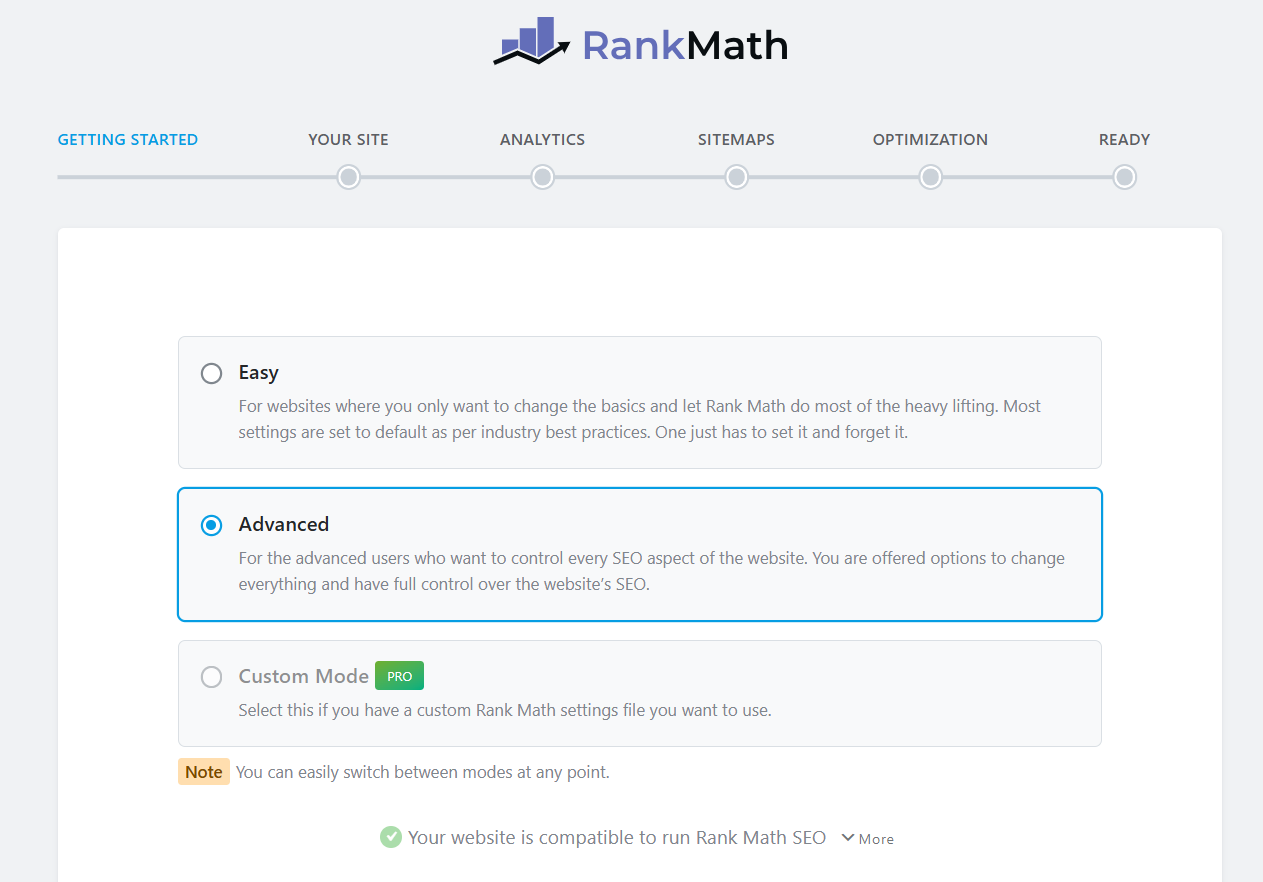
1. Easy Mode
A “set-and-forget” experience for beginners. Rank Math automates settings and hides complex toggles to keep the interface streamlined.
2. Advanced Mode (Recommended)
User-friendly yet transparent, this mode unlocks essential modules—like the 404 Monitor, Redirections, and Schema Markup—vital for a 2026 SEO strategy. This guide follows the Advanced path to ensure maximum optimization.
3. Custom Mode
Exclusive to Rank Math PRO, this allows for importing specific configurations from other domains. This remains locked in the Free version.
Initiating the Advanced Framework
By selecting Advanced Mode, you are choosing precision over automation. This path ensures you aren’t just “checking boxes” but are actively building a site architecture that search engines prioritize.
Defining Your Identity – The “Your Site” Configuration
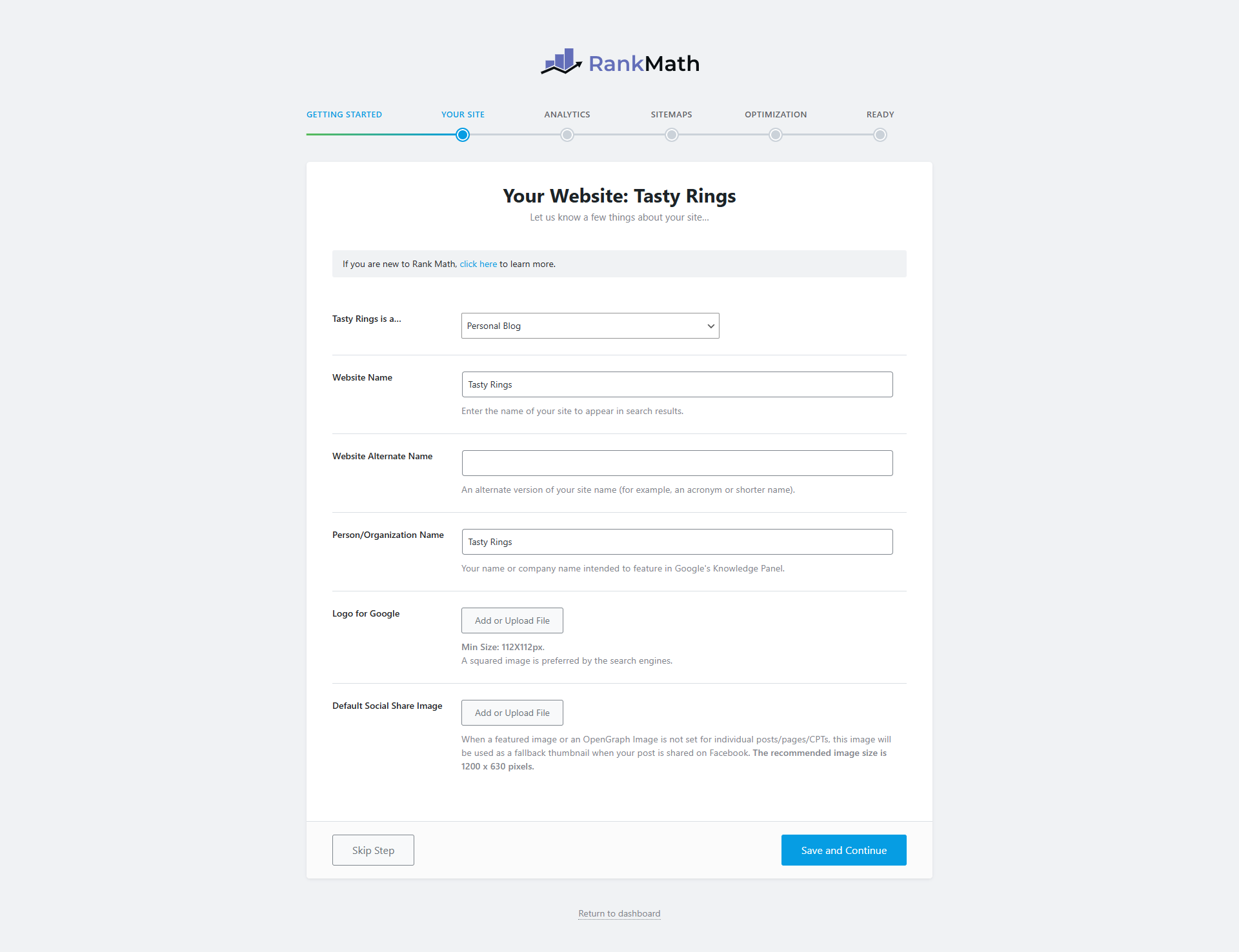
The “Your Site” section is the foundation of your site’s Schema markup. The data you input here directly influences your Knowledge Graph—the authoritative information box Google displays in search results to verify your brand’s identity.
1. Categorizing Your Platform
Select the category that best describes your business (e.g., Personal Blog, News Site, Small Business, or Webshop). This allows Rank Math to apply niche-specific SEO presets and align your structured data with industry standards.
2. Foundational Metadata
Accuracy here is vital for brand consistency:
- Website Name: The primary brand name visible in search results (SERPs).
- Alternate Name: Ideal for acronyms or nicknames; this populates the alternateName code attribute.
- Person/Organization: Your official business entity or personal name.
3. Visual Brand Assets
These images define your presence in Google’s Knowledge Panels and social media:
- Logo for Google: A square logo (min. 112×112 px) to associate your visual brand with your search listings.
- Default Social Share Image: Your “fallback” asset for social media. If a shared page lacks a featured image, platforms like Facebook or X will display this.
- Pro Tip: Use 1200 x 630 pixels to ensure high-resolution display across all social platforms.
Once finalized, click “Save and Continue” to proceed to the Analytics integration.
Integrating Insights – The Analytics Synchronization
This stage is where your preparation pays off. By bridging Rank Math with the Google ecosystem, you transform your WordPress dashboard into a command center for traffic metrics, keyword positioning, and indexing health.
1. Establishing the Connection
Click “Connect Google Services” to initiate a secure OAuth 2.0 handshake. This creates a dedicated bridge between your WordPress server and Google’s APIs.
2. Strategic Permission Alignment
When the authentication window appears, select the Google account used in the previous steps. To ensure full functionality, you must authorize:
- Search Console Data: Monitors search visibility and “Index Status.”
- Analytics 4 (GA4) Data: Fetches visitor behavior and conversion metrics.
- Site Management: Empowers Rank Math to verify your site and submit sitemaps automatically.
3. Finalizing the Secure Bridge
Accept all permission prompts by clicking “Allow.” Restricting these may cause “Data Not Found” errors in your dashboard. Once confirmed, the Wizard will display your specific properties, ready for the final configuration.
Authorizing the Google Connection
This step finalizes the secure handshake between your website and Google’s data servers, allowing Rank Math to pull high-level insights directly into your WordPress panel.
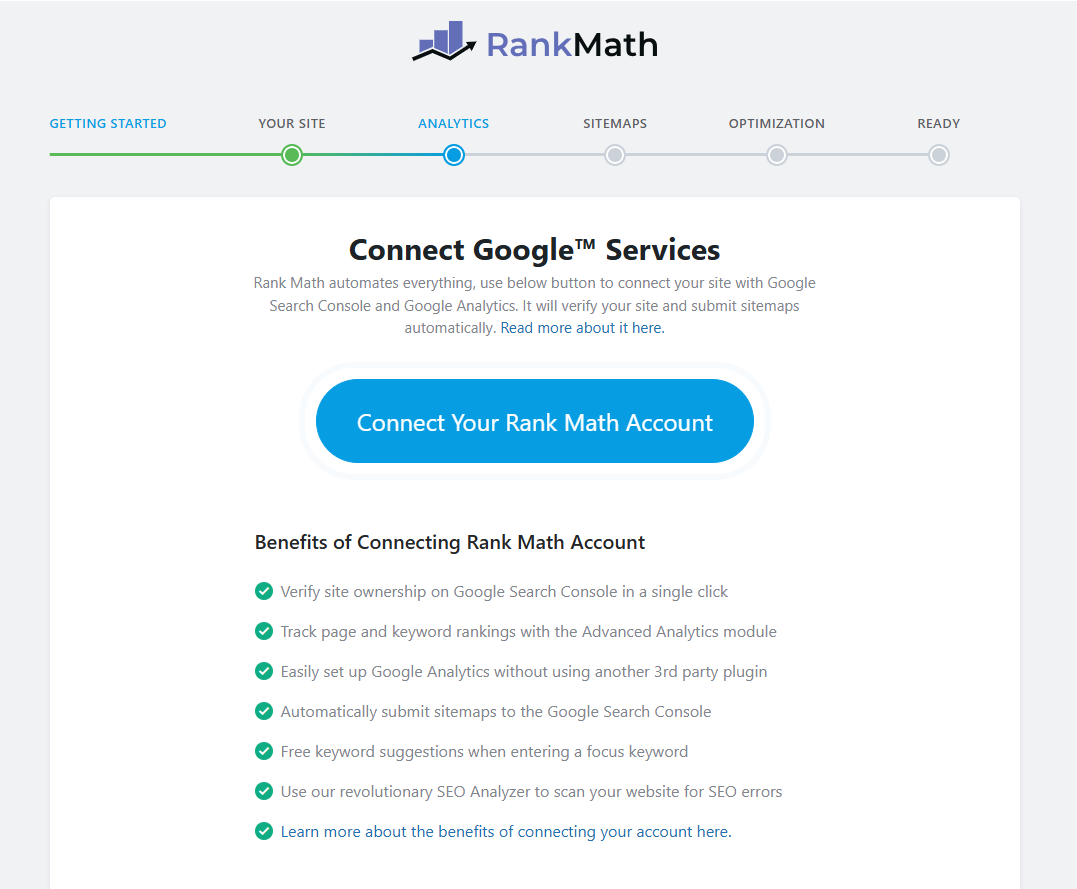
1. Permission Mastery
When the Google access window appears, ensure a seamless 2026 SEO experience by following these steps:
- Check all permission boxes: This allows Rank Math to monitor Search Console performance and GA4 traffic metrics simultaneously.
- Authorize “Allow”: This enables the plugin to populate your dashboard with live keyword rankings and “Index Status” reports, eliminating the need for manual checks on external Google sites.
2. Redirect and Property Verification
After confirmation, Google will return you to the Rank Math Setup Wizard. A success notification will indicate that your account is officially linked. This secure connection activates the dropdown menus, allowing you to select your specific website property and begin final data mapping.
Forging the Data Link – Finalizing Google Authentication
This step serves as the definitive handshake between your domain and Google’s data cloud. By authorizing these specific protocols, you empower Rank Math to act as a real-time bridge, pulling high-level intelligence directly into your WordPress dashboard.
1. Navigating Permission Protocols
After selecting your primary Google account, a window will list several essential access requests. To secure a high-performance 2026 SEO environment, follow these steps:
- Check Every Requirement: Ensure all permission boxes are selected. This allows Rank Math to synchronize Search Console visibility and GA4 engagement metrics simultaneously.
- Authorize the “Allow” Command: This grants the plugin permission to populate your site with live keyword rankings and “Index Status” reports, eliminating the need to visit external Google sites manually.
2. Verification and Property Sync
Once confirmed, Google will automatically return you to the Rank Math Setup Wizard. A success notification will verify that your account is officially synchronized. This live connection now activates the dynamic dropdown menus, allowing you to select your specific website property and begin final data mapping.
Dashboard Integration – Linking Your Search Console Data
Once the Google authentication concludes, the Setup Wizard will refresh to reveal the Search Console configuration panel. This step ensures that Google’s health report for your site is mirrored directly within your WordPress environment.
1. Target URL Selection
Navigate to the “Site” dropdown menu and choose your website’s specific URL from the populated list.
- Note: If your domain does not appear instantly, wait a few seconds; the API sync occasionally requires a moment to pull the latest property list from Google’s servers.
2. Activating Live Index Visibility
Locate the toggle for “Enable the Index Status Tab” and switch it to the “On” position. This is a vital diagnostic feature—it empowers Rank Math to show you exactly which pages Google has successfully crawled and indexed (and which ones are being blocked) without you ever having to leave your dashboard.
Traffic Calibration – Mapping Your GA4 Properties
Below the Search Console settings, you will find the Analytics Configuration panel. This is where you finalize the bridge to the Google Analytics 4 (GA4) property built in previous steps.
1. Property Selection
Use the dropdown menus to select your Account, Property, and Data Stream. Ensure these match the specific names you assigned in the Google Analytics interface to maintain data integrity.
2. Essential Tracking Protocols
Enable these toggles to ensure your data is clean and your site remains lightweight:
- Install Analytics Code: Toggle “On”. Rank Math will automatically inject the tracking script into your site’s header, removing the need for manual coding or extra plugins.
- Exclude Logged-in Users: Toggle “On”. This filters out your own administrative visits, ensuring your reports reflect actual visitor behavior rather than your own editing sessions.
3. Professional Privacy & Speed (Pro Tier)
If you are using Rank Math Pro, you can activate two specialized features:
- IP Anonymization: Masks visitor IPs to comply with global privacy laws like GDPR.
- Self-Hosted Analytics: Stores the tracking script on your own server to reduce external requests and boost page load speeds.
Revenue Integration – The AdSense Module
Directly beneath the Analytics settings is the AdSense configuration panel. This specialized integration is a premium feature reserved for Rank Math SEO PRO users, designed to centralize your monetization data.
1. Unified Monetization Tracking
By synchronizing your Google AdSense account, you can import high-level revenue metrics—such as total earnings, ad impressions, and historical performance—directly into your WordPress administrative area. This “single-pane-of-glass” view helps you correlate specific content performance with its actual revenue generation.
2. Streamlined Setup
To activate this feature, simply select your verified AdSense profile from the dropdown menu. Rank Math will automatically initialize the data bridge and begin populating your dashboard with live monetization insights.
Commit Your Settings
Once you have audited your Search Console, Analytics, and AdSense configurations, click “Save and Continue.” This action saves your global data preferences and transitions you to the technical site-mapping phase.
Content Blueprinting – The Sitemaps Configuration
The Sitemaps step generates a digital roadmap for search engines. This file ensures that crawlers from Google, Bing, and DuckDuckGo can efficiently discover, navigate, and index your entire content library.
1. Intelligent Content Discovery
Rank Math automatically scans your site to identify various content structures. This includes standard posts and pages, but also specialized custom post types (like portfolios or products) and taxonomies.
2. Curating Your Indexing Strategy
You have granular control over which assets search engines see. For a professional 2026 setup, configure these key toggles:
- Include Images: Toggle “On.” This indexes your visual media for Google Image Search, opening an additional stream of organic traffic.
- Public Post Types: Select Posts and Pages. Exclude any “private” or “utility” post types that provide no value to a searcher.
- Public Taxonomies: Check Categories but typically leave Tags unchecked. Including tags often leads to “Thin Content” or duplicate content issues, which can dilute your SEO authority.
3. Finalizing the Map
Audit your selections to ensure only high-value, public-facing content is included. Once verified, click “Save and Continue” to transition into the final technical optimization phase.
Technical Precision – The SEO Optimization Tweaks
The Optimization phase automates critical technical tasks that typically require manual code. These “SEO Tweaks” refine how search engines perceive your site’s authority and how users interact with your links.
1. Noindex Empty Archives
WordPress generates archive pages for every category and tag. If these are empty, they create “thin content” that can trigger search engine penalties.
- The Action: Enabling this prevents Google from indexing empty category or tag pages.
- The Benefit: It preserves your Crawl Budget, ensuring search bots focus only on your high-value, content-rich pages.
2. Nofollow External Links
Standard links pass “link equity” (SEO authority) to the destination site.
- The Action: This adds rel=”nofollow” to all outbound links automatically.
- Strategic Tip: Leave this OFF for most sites. In 2026, linking to high-authority, relevant resources is a positive “E-E-A-T” signal. Only use this if you want to strictly control every ounce of your site’s ranking power.
3. Open External Links in New Tab
This is a vital User Experience (UX) and retention setting.
- The Action: It adds target=”_blank” to all links leading away from your domain.
- The Benefit: It keeps your website open in the original tab, reducing your Bounce Rate and keeping users engaged with your brand even after they click away.
Completing the Wizard
The default Rank Math settings are highly optimized for a 2026 workflow. Once you’ve verified your choices, click “Save and Continue” to finalize your core configuration and exit the Setup Wizard.
The Finish Line – Your Site is SEO-Ready!
The final screen of the Advanced Setup Wizard confirms your foundational configuration is complete. However, there is one critical maintenance setting to enable before you exit.
1. Automating Your Edge: Plugin Updates
Toggle the “Auto-Update Plugin” option to “On.” In the rapidly shifting 2026 search landscape, manual updates are a liability. Auto-updates ensure:
- Instant Feature Access: You receive new AI and indexing tools the moment they launch.
- Security & Speed: Critical patches and performance optimizations are applied immediately to keep your site secure and Core Web Vital-compliant.
- Algorithmic Alignment: Your tools stay synchronized with the latest Google and Bing documentation without intervention.
2. Transitioning to Deep Optimization
While your foundation is set, professional SEO requires “Advanced Options.” Instead of returning to the dashboard, click “Setup Advanced Options.” This unlocks the final tier of high-level controls, including the Role Manager (access control) and the 404 Monitor (link health), ensuring your site remains a high-performance asset.
Access Control – The Role Manager
The Role Manager provides granular authority over who can modify your SEO configurations. For multi-author sites, this is a vital safeguard against accidental changes to critical technical settings.
1. Segmenting Authority
Rather than granting universal access, you can restrict Rank Math features based on WordPress user levels (Editor, Author, Contributor, etc.):
- On-Page SEO: Enable Authors to refine their own meta titles and descriptions without granting access to sitewide settings.
- Technical Modules: Restrict elite tools like Redirections or the 404 Monitor to Administrators only.
- Data Privacy: Control exactly which team members can view your integrated Analytics and keyword ranking reports.
2. Security & Workflow Efficiency
This module ensures your SEO strategy remains consistent, even with a rotating team of contributors. Note: If you are a solo operator, you can keep this module Disabled to minimize dashboard clutter.
3. Commit & Advance
After auditing your permission levels, click “Save and Continue” to transition into the final phase: technical health monitoring.
Eliminating Dead Ends – 404 Monitor & Redirections
This section activates a critical two-part defense system. These tools ensure that both users and search bots never encounter a broken link, preserving your site’s authority and user trust.
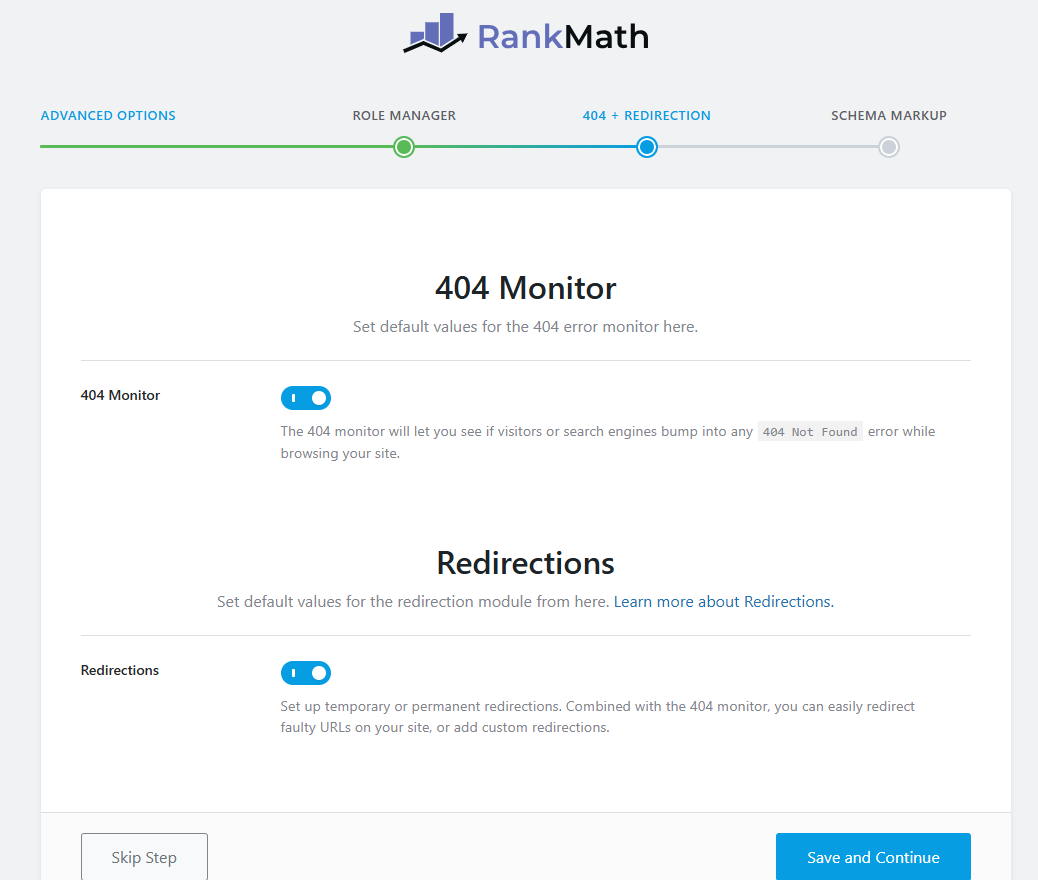
1. The 404 Monitor
A 404 error signifies a “Page Not Found.”
- The Action: Toggle this “On” to log every instance where a visitor or crawler hits a dead URL.
- The Benefit: It acts as an early warning system, allowing you to catch broken links or crawl errors before they negatively impact your 2026 search rankings.
2. The Redirections Module
This tool allows you to point broken or outdated URLs to active, relevant content.
- The Action: Toggle this “On” to enable the management of 301 (Permanent) and 302 (Temporary) redirects.
- SEO Strategic Value: When you redirect a broken page that has existing backlinks, you “rescue” that Link Equity and pass it to a new page, ensuring no ranking power is wasted.
3. Finalizing Site Health
With both monitors active, Rank Math will now alert you to errors and provide the interface to fix them instantly. Click “Save and Continue” to proceed to the final step of the Advanced Setup.
Contextual Clarity – Schema Markup
The final step of the Advanced Setup focuses on Schema Markup. This “structured data” layer acts as a translator, ensuring search engines understand your content’s context in a modern, AI-driven search landscape.
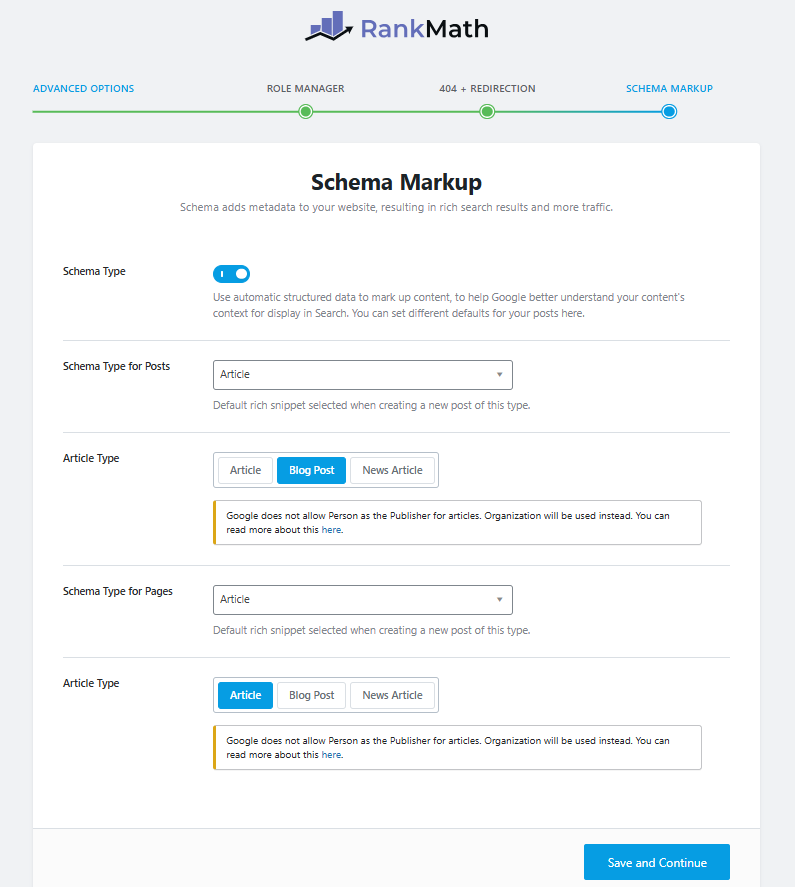
1. Why Schema Matters
Schema defines your content for Google. Instead of just “text,” it identifies an “Article,” “Product,” or “Review.”
- The Benefit: This clarity makes you eligible for Rich Results (star ratings, FAQ dropdowns, etc.), which significantly boosts your Click-Through Rate (CTR).
2. Automated Defaults
Rank Math simplifies this by applying global presets:
- Posts: Set to Article schema automatically.
- Pages: Usually set to Article or Service based on your site type.
3. Strategic Advice
If you are unsure, keep the default settings. They are pre-optimized for 2026 industry standards. Click “Save and Continue” to finalize your setup and enter your new SEO dashboard.
Mastering Redirections – Keeping Your Site Error-Free
After completing the initial setup, you can fine-tune how your site handles missing content by navigating to Rank Math SEO > General Settings and selecting the Redirections tab. Proper configuration here ensures that visitors never hit a dead end, protecting your site’s search integrity.
1. Essential Redirection Tweaks
For a professional 2026 setup, configure your redirection rules as follows:
- Debug Redirections: Keep this OFF. This is a troubleshooting tool that displays an interstitial page before a redirect happens; it’s helpful for testing but disruptive for regular users.
- Fallback Behavior: Select Default 404. While redirecting every error to your homepage might seem helpful, Google often treats these as “Soft 404s,” which can confuse crawlers and dilute your homepage’s SEO authority. A clean 404 page is the safer, standard practice.
- Redirection Type: Choose 301 Permanent Move. This is the industry-standard code that tells search engines your content has moved for good, successfully transferring your “link juice” to the new URL.
- Auto Post Redirect: Toggle this ON. This is a high-value safety net—if you ever change a post’s URL (slug), Rank Math automatically creates a redirect from the old link to the new one, preventing broken links across the web instantly.
2. Saving Your Configuration
Once these toggles are set, scroll to the bottom and click “Save Changes.” Your site is now equipped to handle URL changes and missing pages with professional-grade precision.
Speed to Market – Setting Up Instant Indexing
Instant Indexing (via the IndexNow protocol) bypasses the traditional “wait and see” crawl cycle. Instead of waiting days for search engines to discover your updates, this tool sends a direct “push” notification to notify them of changes almost immediately.
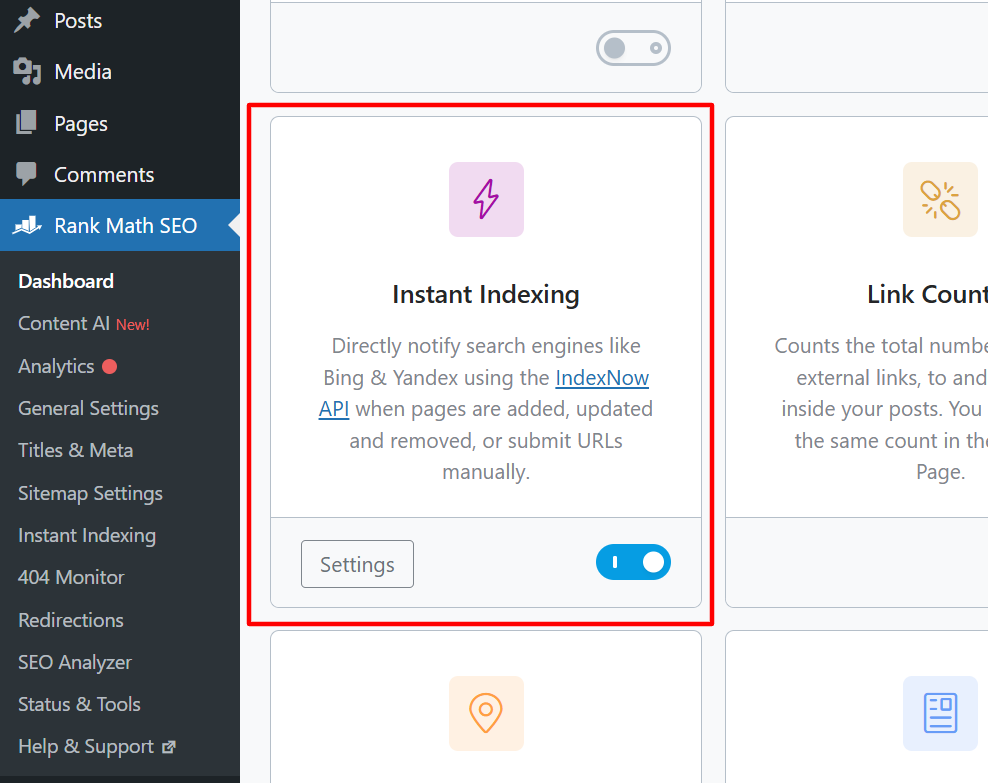
1. Why Instant Indexing is a 2026 Essential
- Faster Rankings: Critical for time-sensitive content like news, product launches, or seasonal updates.
- Immediate Discovery: Informs participating engines (like Bing and Yandex) the moment you hit “Publish,” “Update,” or “Delete.”
- Server Efficiency: By telling bots exactly which pages have changed, you reduce unnecessary exploratory crawling, lowering your server load.
2. Activating the API Connection
Rank Math makes this complex process remarkably simple. While other platforms require manual file management, Rank Math handles the heavy lifting:
- Locate Your Key: Navigate to Rank Math SEO > Instant Indexing and click the Settings tab. Rank Math will have already generated a unique API Key for you.
- Automated Hosting: Unlike manual setups, Rank Math hosts this key dynamically. To confirm it’s working, click the “Check Key” button. If a new tab opens displaying your key, search engines can successfully verify your site.
- Troubleshooting (Manual Backup): If the “Check Key” test fails (returning a 404 or 403 error), simply create a text file named [your-api-key].txt, paste the key inside, and upload it to your site’s root directory (usually public_html) via FTP or your hosting File Manager.
3. Submission Strategy
- Automatic Submissions: Under the Settings tab, select the Post Types (typically Posts and Pages) you want Rank Math to ping automatically.
- Manual Submissions: For older content or pages not yet appearing in search, use the “Submit URLs” tab. Paste your URLs and click “Send to API” to request an immediate crawl.
AI Visibility – Setting Up LLMS (Large Language Model Signals)
LLMS (Large Language Model Signals) is a cutting-edge 2026 feature. It generates a specialized llms.txt file at your site’s root, acting as a “VIP Roadmap” for AI models like ChatGPT, Claude, and Gemini. While sitemaps help search engines find pages, the llms.txt file ensures AI agents prioritize your most authoritative data for their generated answers.
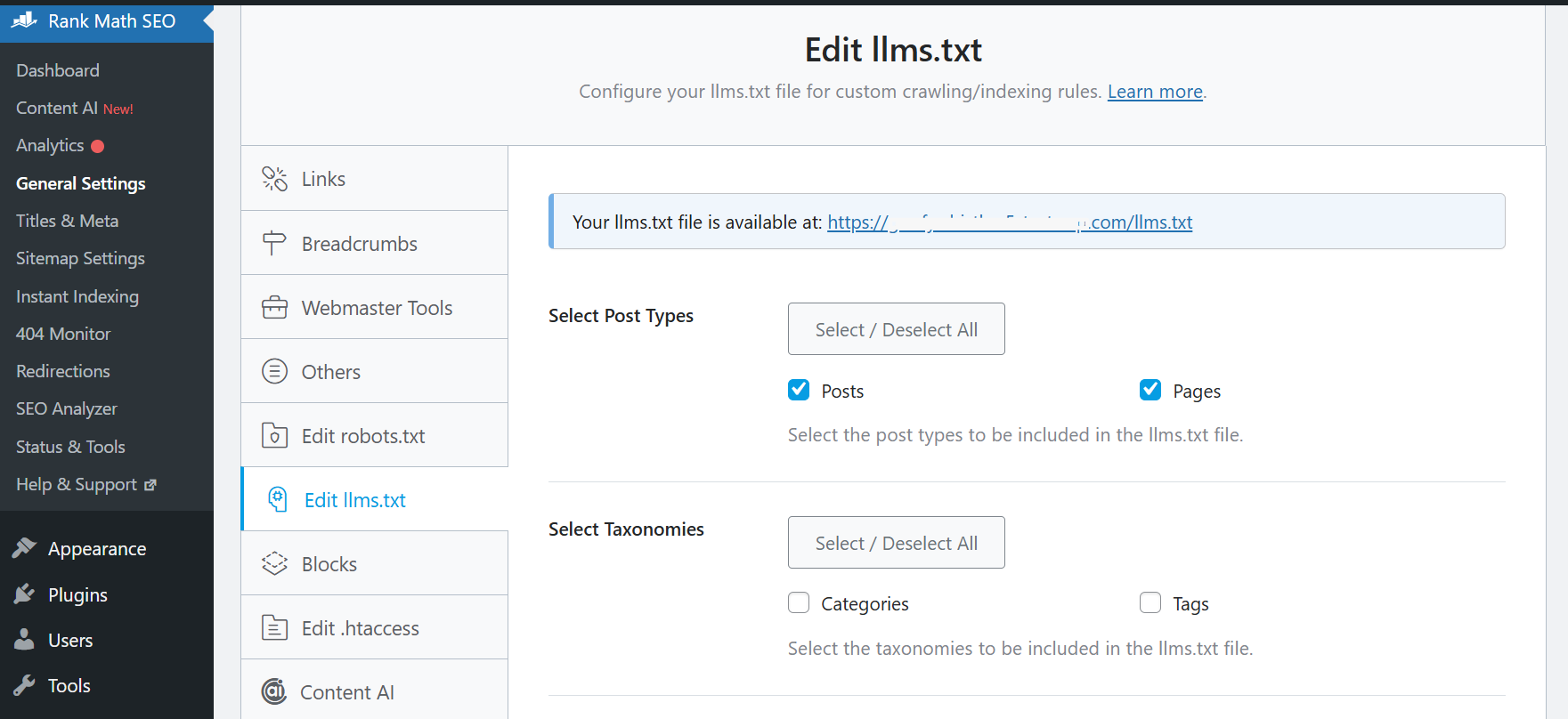
Step 1: Activate the Module
- Navigate to Rank Math SEO > Dashboard.
- Locate the LLMS Txt module and toggle it to “On.”
- Click the Settings button to configure your AI signals.
2. Configure Your AI Strategy
On the settings page, define what information AI bots should ingest:
- Select Post Types: Check Posts, Pages, and Products. Rank Math automatically respects “noindex” tags, keeping private content hidden from AI.
- Select Taxonomies: Enable Categories to give AI a clear view of your site’s topical hierarchy.
- Posts/Terms Limit: Set this between 50 and 100. This keeps the file concise, preventing “token bloat” that can confuse AI models.
- Additional Content: Use this field to manually list your Cornerstone Content or a brief “Brand Summary” that you want AI to prioritize when citing your site.
3. Save and Verify
Click “Save Changes” to generate the file. To verify, visit yourdomain.com/llms.txt in your browser. You should see a clean, Markdown-formatted roadmap of your best content, ready for the next AI bot that visits.
Bridging the SEO Gap – The ACF Module
Local SEO provides search engines with the structured data (LocalBusiness Schema) needed to understand your physical presence. This is the key to appearing in the Google Maps “Local Pack” and “near me” results.
1. Why This Integration is Vital
- Holistic Content Analysis: Rank Math will include text within your ACF fields in its SEO scoring. This gives you a more accurate 2026 content score based on all the information on the page, not just the main body text.
- Automated Schema Power: You can pull data directly from custom fields to populate Schema Markup. For example, an ACF “Price” field can automatically feed into your Product Schema, keeping your rich snippets accurate without double entry.
- Image Discovery: If you use ACF for image galleries or specialized visual data, Rank Math can detect these and include them in your XML Sitemaps, boosting your visibility in image search.
2. Activating the Connection
If you have the ACF plugin installed, follow these steps:
- Navigate to Rank Math SEO > Dashboard.
- Scroll to the ACF information card.
- Toggle the switch to “On.”
3. Strategic Advice
Only enable this module if you are actively using ACF to store public-facing content. If your custom fields are purely for internal administrative notes, keep this module OFF to keep your database lean and your analysis focused only on what matters to search engines.
Dominating Local Search – Setting Up Local SEO
Local SEO is a specialized suite of tools designed to help search engines understand your physical presence. By enabling this module, Rank Math adds LocalBusiness Schema (structured data) to your site, providing Google with critical details like your address, phone number, and hours of operation. This is the ultimate key to appearing in the Google Maps “Local Pack” and “near me” search results.
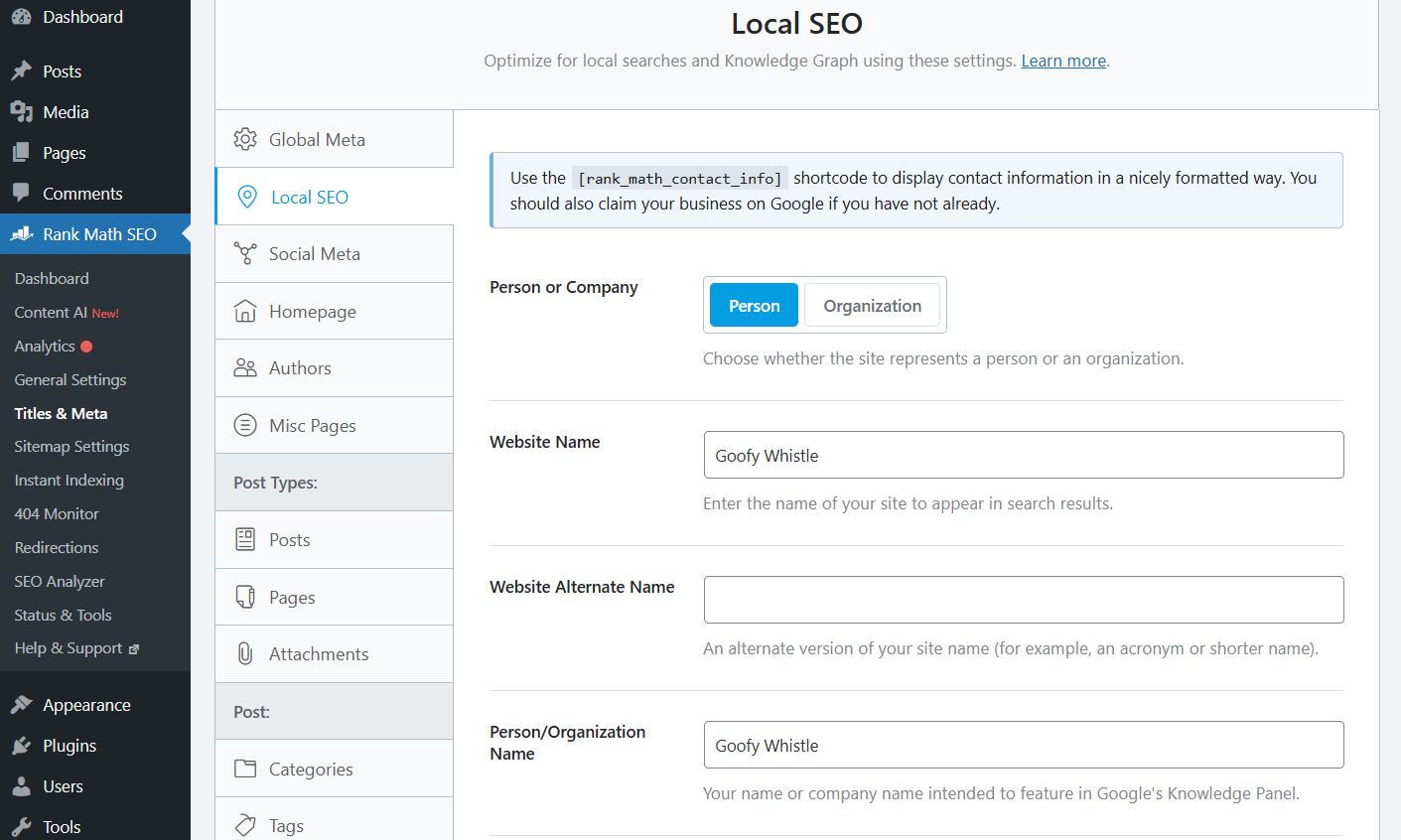
1. Who Needs Local SEO?
- Essential for Businesses: Non-negotiable for restaurants, clinics, shops, or agencies with physical locations or service areas.
- Strategic for Blogs: Beneficial for personal brands or niche sites (like regional travel) to establish geographic authority.
2. Defining Your Business Identity
Navigate to Rank Math SEO > Titles & Meta > Local SEO to configure your “Knowledge Graph”:
- Person or Company: Select “Organization” for a business or “Person” for an individual.
- Naming: Enter your official name and any common acronyms in the “Alternate Name” field.
- Logo: Upload a square logo (min. 112×112 px) for Google’s Knowledge Panel.
- NAP Consistency: Enter your Name, Address, and Phone number. Crucial: These must match your Google Business Profile exactly.
- Verification Pages: Link your About and Contact pages so Google can verify your legitimacy.
3. Maximizing Your Local Reach
Rank Math includes a specific advisory to help you scale your local presence. Here is how to act on those recommendations:
- The Contact Shortcode: Use [rank_math_ contact_info] in your footer or sidebar. Updating your info in Rank Math will automatically sync it across your entire site.
- Google Business Profile: You must claim your official profile separately. Rank Math handles your on-site code, but the Google Business Profile is what puts you on the map with reviews and hours.
Customizing Your Setup – Activating Specialized Modules
Rank Math is modular, allowing you to activate only the features your specific site needs. This keeps your dashboard clean and your site performance high.
1. How to Manage Modules
To customize your toolkit, navigate to Rank Math SEO > Dashboard:
- Toggle Features: Find a module (like WooCommerce or Image SEO) and switch it “On.”
- Configure: Click the “Settings” button that appears on the module card to fine-tune its behavior.
- Efficiency: Only enable what you use. Keeping unused modules “Off” preserves server resources.
2. Essential Specialized Modules
- WooCommerce: Adds Product Schema and cleans up shop URLs. Essential for e-commerce.
- Image SEO: Automatically adds missing ALT and Title tags. This saves hours of manual work and boosts visibility in image search.
- Community (bbPress/BuddyPress): Adds proper meta tags to forum posts and profiles, preventing indexing issues common in community sites.
- AMP: Ensures fast-loading mobile pages carry the correct SEO tags for Google’s “Top Stories” carousels.
3. Rank Math PRO Features
The PRO version unlocks specialized modules for complex content:
- Video & News Sitemaps: Vital for appearing in the Google “Videos” tab or Google News.
- Podcast Module: Generates the Schema and RSS feeds needed to rank audio content.
- Advanced Analytics: Provides a built-in keyword tracker and historical traffic data.
Turning Strategy into Action – Optimizing Your Content
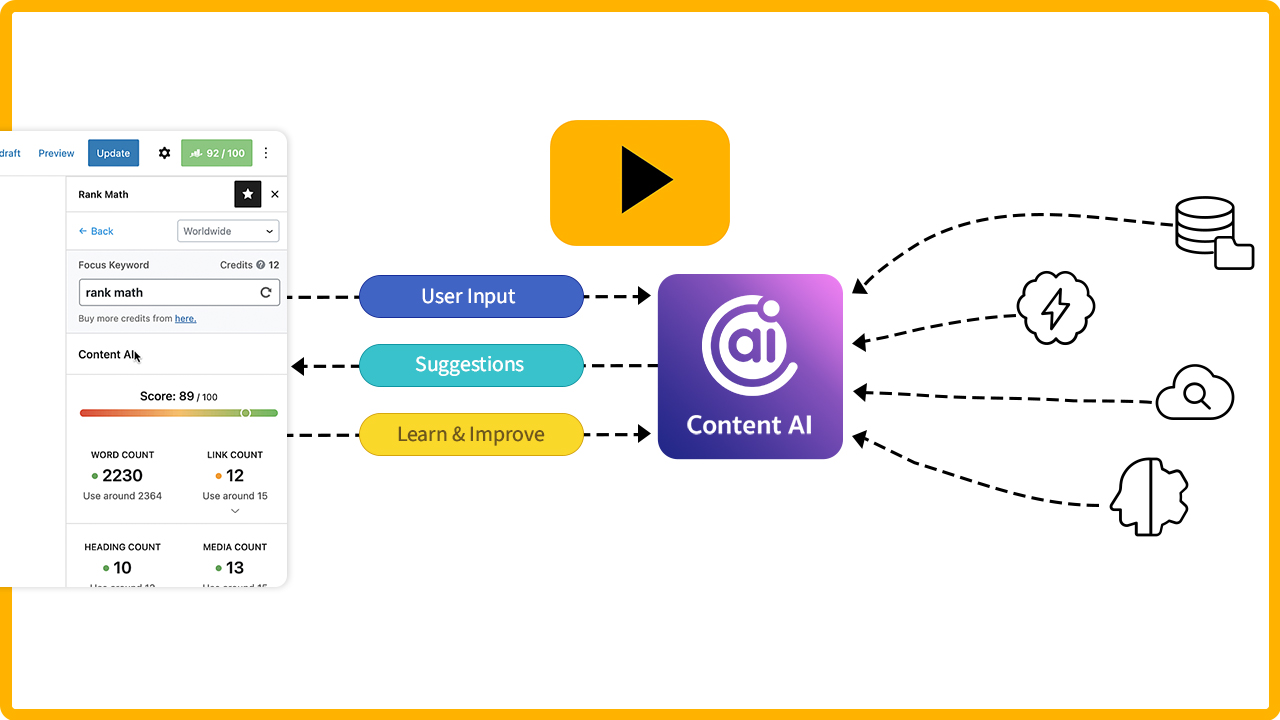
The Rank Math Content Analyzer is a live SEO coach that provides real-time suggestions to maximize visibility while you write.
1. The Four Pillars of Analysis
The tool dynamically grades your content against these critical areas:
- Keywords: Monitors density and placement in titles, intros, and body text.
- Structure: Ensures a logical hierarchy using headings (H1, H2, etc.).
- Links & Media: Verifies internal/external links and optimized images.
- Readability: Analyzes flow and sentence length to improve user retention.
2. A Universal Workflow
Whether crafting a blog post or a product page, the interface remains consistent:
- Scoring: You receive a numerical grade (0–100) and a color-coded checklist (Red, Yellow, Green).
- The Goal: Aim for “Green” (81+), but prioritize high-quality, helpful information over just chasing a perfect score.
3. AI-Powered Assistance
The Content AI module offers advanced 2026 insights:
- Smart Suggestions: Recommends related keywords and audience-focused questions.
- Search Readiness: Helps optimize content for both traditional Google results and AI-driven search responses.
Design & Data – Opening the Rank Math SEO Panel in the Classic Editor
If you prefer the Classic Editor, Rank Math integrates directly below your content area, allowing you to refine your search presence without leaving the page.
1. Accessing the SEO Meta Box
To begin optimizing, scroll to the bottom of your post or page editor.
- The Location: Below the main text window, you will find the Rank Math SEO Meta Box.
- The Interface: This panel houses your SEO score, optimization checklist, and snippet preview. It stays pinned to the bottom of your editor for easy access while you write.
2. Setting Your Focus Keywords
In the General tab of the Meta Box, locate the Focus Keyword field. This defines the primary topic for search engines:
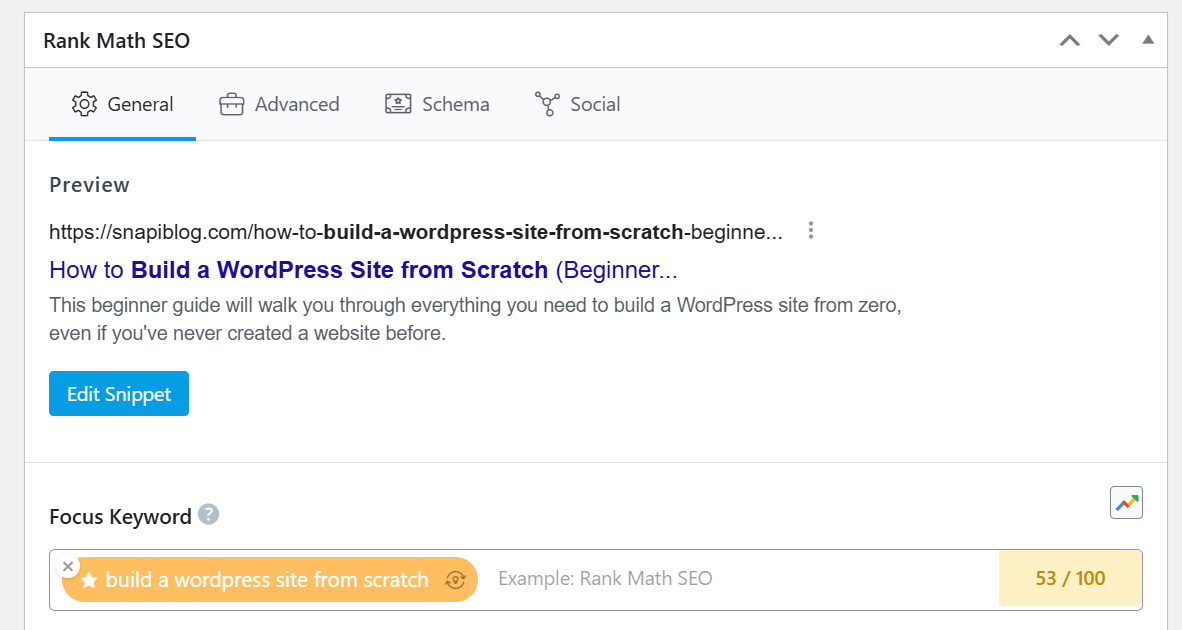
- Main Keyword: Enter the primary phrase you want this page to rank for.
- Keyword Suggestions: Rank Math suggests variations and related phrases as you type, helping you capture broader traffic.
- Multiple Keywords: The free version allows up to 5 focus keywords per page—perfect for targeting a main topic and its synonyms.
- Pro Advantage: Upgrading to Rank Math PRO removes this limit, allowing for unlimited keywords on high-authority, long-form guides.
3. Optimizing the Snippet
Click “Edit Snippet” within the panel to customize how your page looks in search results. Here, you can manually adjust your SEO Title and Meta Description to increase your click-through rate.
Design & Data – Accessing Rank Math in the Classic Editor
In the Classic Editor, Rank Math integrates directly into your page-building workflow, placing its optimization suite exactly where you need it most.
1. Locating the SEO Meta Box
When editing a post or page, you don’t need to search for hidden tabs or sidebars.
- The Location: Simply scroll down past the main content area to find the section titled “Rank Math SEO.”
- The Interface: This Meta Box contains your complete optimization suite organized into four tabs: General, Advanced, Schema, and Social. This allows you to manage technical SEO without leaving the page.
- Pro Tip: If you don’t see it, click “Screen Options” at the top-right of your screen and ensure “Rank Math SEO” is checked.
2. Setting Your Focus Keywords
In the General tab, the Focus Keyword section is your primary tool for defining search targets:
- Main Keyword: Enter your primary term; Rank Math will immediately begin grading your content against this phrase.
- Keyword Suggestions: As you type, Rank Math pulls Google Autocomplete suggestions and LSI variations to help you capture broader organic reach.
- Multiple Keywords: The free version allows up to 5 focus keywords per page—ideal for targeting a main topic and its immediate synonyms.
- Pro Advantage: Rank Math PRO removes this limit, allowing for unlimited keywords—a “must-have” for high-authority, long-form guides.
Mastering the SEO Checklist in the Classic Editor
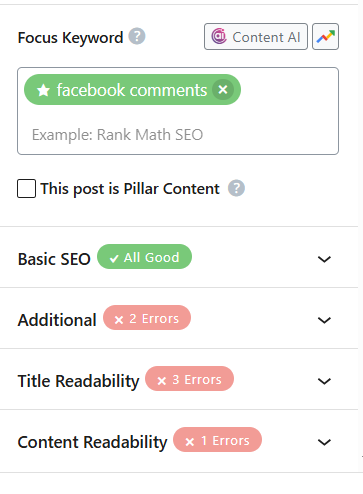
Directly below the Focus Keyword section in the Rank Math Meta Box (located at the bottom of your Classic Editor screen), you will find the SEO Checklist. This is your actionable “to-do list” for on-page optimization. It is divided into four key sections to help you systematically improve your content’s search performance.
1. The Four Pillars of the Checklist
Each tab provides specific tests that help “translate” your content for 2026’s search algorithms:
- Basic SEO: These are your non-negotiables. Rank Math checks if your focus keyword is in the SEO Title, Meta Description, URL (slug), and the first 10% of your content. It also monitors your overall word count.
- Additional: This section handles structural authority. It looks for keywords in your subheadings ($H_2$, $H_3$, etc.) and Image Alt attributes. It also ensures you have a healthy density of internal and external links.
- Title Readability: This evaluates your “click-magnet” potential. Rank Math checks for Power Words, numbers, and whether your title starts with the focus keyword to ensure you stand out in a crowded SERP.
- Content Readability: This ensures your post is user-friendly. It suggests using short paragraphs, adding media to break up text, and checking if you’ve used a Table of Contents (crucial for long-form 2026 content).
2. Understanding Your SEO Score
As you check off these tasks, the numerical score (0–100) in the Meta Box header will update in real-time. The colors indicate your optimization health:
| Score | Color | Meaning |
| 0–50 | Red | Poorly optimized; likely won’t rank for your target keyword. |
| 51–80 | Yellow | Good foundation, but missing key structural or readability signals. |
| 81–100 | Green | Well-optimized and ready for search engine discovery. |
Recommendation: While a perfect 100/100 feels satisfying, aim for a score of 85+. This ensures your content is technically superior while remaining natural and conversational for your human readers.
Advanced Schema & Metadata in the Classic Editor
While global defaults were set during the initial wizard, Rank Math’s strength lies in its ability to assign unique Schema types and custom Metadata to individual pages. Since every piece of content serves a different purpose, customizing these settings ensures search engines provide the most accurate “Rich Results” for your site.
1. Customizing Schema for Precision
Precision is the key to winning eye-catching search snippets like star ratings or FAQ dropdowns. To refine the structured data for your current post:
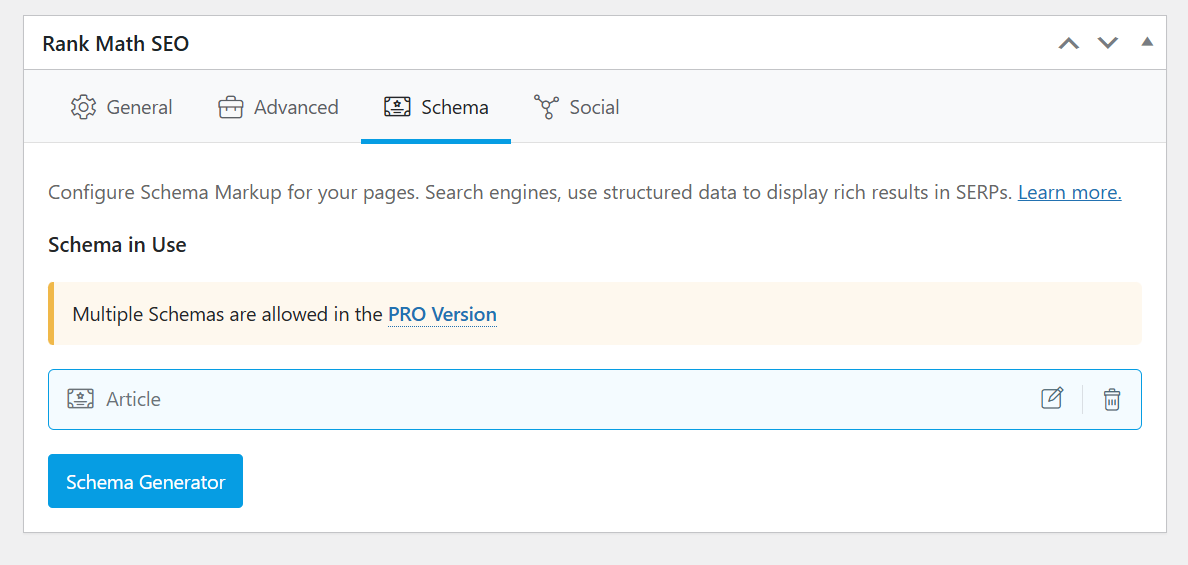
- Access the Schema Tab: Scroll to the Rank Math SEO Meta Box at the bottom of the Classic Editor and click the Schema tab.
- The Schema Generator: Click the “Schema Generator” button to choose a template that matches your content type:
- How-to: Displays step-by-step instructions directly on Google.
- Review: Adds gold stars to your search listing.
- Article: The standard for blog posts and news.
- The Schema Builder: Once a template is selected, fill in as many fields as possible. The more data you provide, the higher your chance of qualifying for a Rich Result.
- Free vs. Pro: The Free version supports one Schema type per post (replacing the default). Rank Math PRO supports Multi-Schema, allowing you to combine types (e.g., Article + FAQ) on a single page for maximum visibility.
2. Perfecting Your Search Snippet
Your Meta Title and Description form the “digital storefront” users see on Google. Well-optimized metadata clarifies your purpose for bots and boosts your Click-Through Rate (CTR).
Accessing the Snippet Editor
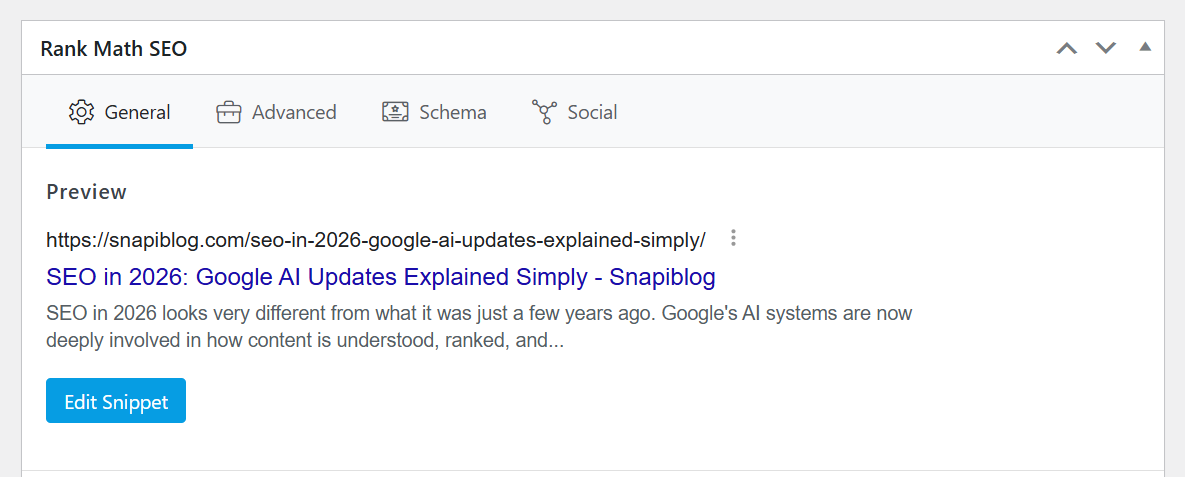
In the General tab of the Rank Math Meta Box, click the blue “Edit Snippet” button. This opens the Preview Snippet Editor, showing your layout for both mobile and desktop.
Crafting High-Impact Metadata
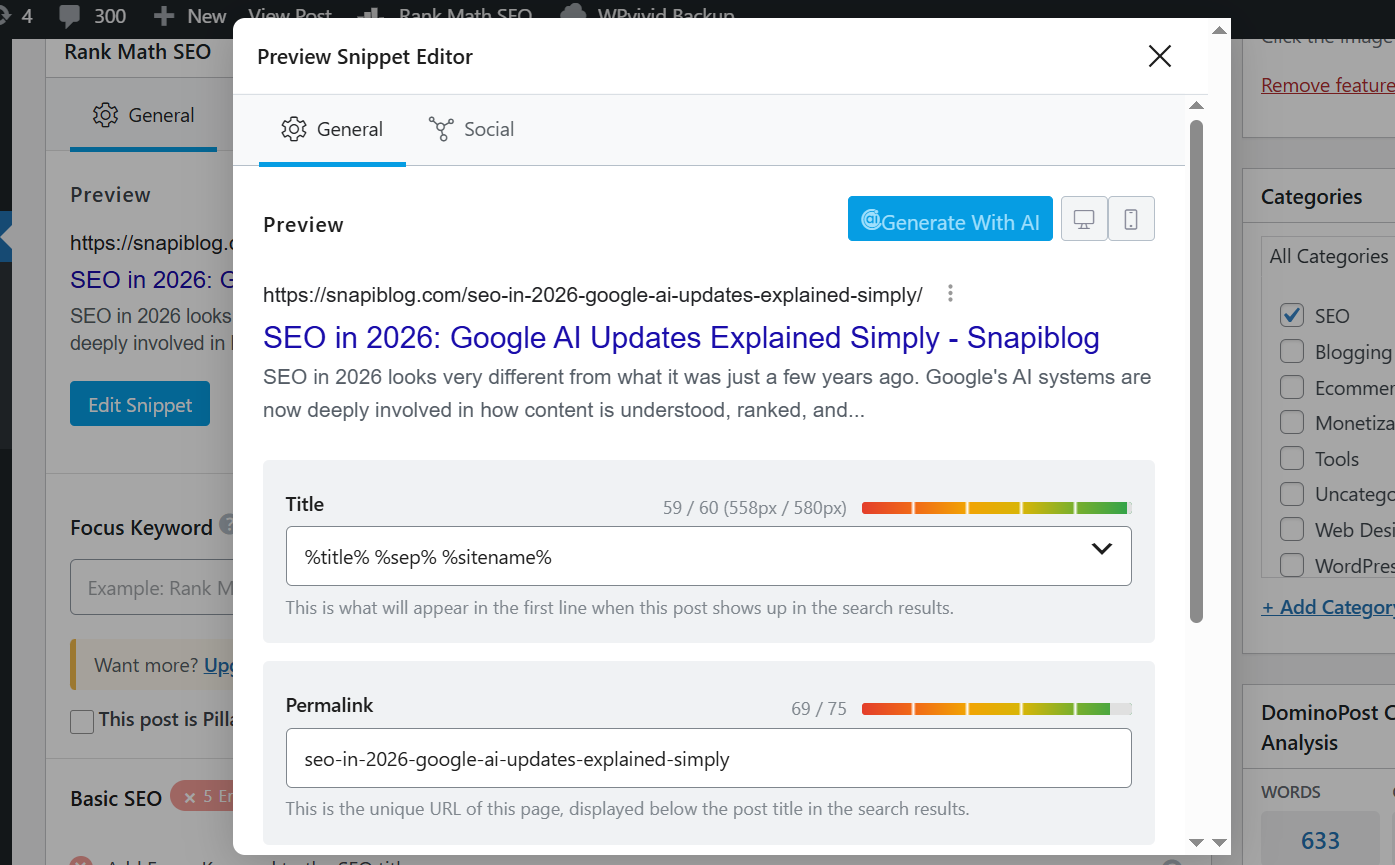
- The Title Field: Include your primary keyword and keep it under 60 characters. Rank Math’s green progress bar will tell you when you’ve hit the “sweet spot.”
- The Description Field: Provide a summary that matches user intent. Keep this under 160 characters to ensure the text isn’t cut off by Google.
- The Permalink (Slug): Ensure your URL is clean and descriptive (e.g., yourdomain.com/classic-editor-seo).
Using Dynamic Tags for Efficiency
Instead of manual typing, click the arrow icon in the input fields to use Dynamic Tags.
- Automation: Tags like %title%, %excerpt%, or %currentmonth% automatically pull data from your site.
- Consistency: This ensures your brand format remains uniform across hundreds of posts without manual effort.
3. Finalizing Your Content
Once your keywords are set, your checklist items are green, and your Schema and Snippets are optimized, your content is fully prepared. You can now Publish or Update your post with the confidence that it is built on a professional-grade SEO foundation.
Global Metadata & Indexing Controls
Before diving into high-level analysis, it’s important to understand the “Global” settings in Rank Math. These tools allow you to manage large-scale sites efficiently, ensuring consistency across hundreds of pages without requiring you to manually edit the Meta Box of every single post or product.
1. Global Meta Templates
For websites with extensive content or massive e-commerce inventories, manual optimization is impossible. Rank Math’s global templates act as a site-wide “safety net.”
- Consistency: You can create a unified title and description structure for blog categories, tags, or shop items.
- Automatic Application: Once a template is saved, Rank Math automatically applies that structure to all current and future items in that group, maintaining your brand voice across search results instantly.
2. Manual Indexing Control
As your site grows, you may need more granular control over what Google sees.
- Flexible Visibility: Rank Math lets you manually decide which content types should be hidden from search engines (using the “noindex” tag).
- Internal Protection: This is perfect for “Thank You” pages, private member portals, or utility pages that you want users to access but don’t want appearing in public search results.
- Global Overrides: You can set rules at the post-type level to ensure specific sections of your site never accidentally leak into Google.
Global Meta Titles & Descriptions
Global Meta Templates use Dynamic Tags to automatically generate search listings based on a predefined structure. This turns hours of manual work into a one-time configuration.
1. When to Use (and Avoid) Global Templates
- Best for Categories & Products: If you have 500 product categories, automation is your best friend. It ensures every category looks professional and structured in search results.
- Avoid for Blog Posts: Caution: I do not recommend using global templates for individual blog posts. Posts target unique keywords and user intent; a generic template will produce weak metadata. Always write blog metadata manually in the Classic Editor Meta Box for maximum ranking potential.
2. How to Configure Titles & Meta
To set up your site-wide templates, navigate to Rank Math SEO > Titles & Meta:
- Select Content Type: Choose the section you want to automate (e.g., Categories or Products).
- Build Your Template: Use a mix of static text and Dynamic Tags.
- Common Tags: %title% (The page name), %category% (The parent category), and %sep% (Your chosen separator character like – or |).
- Dynamic Updates: These tags pull real-time info. A template like %title% %sep% %sitename% will automatically display as “Summer Collection – My Store” on your category page.
3. Pro-Tip: Category-Level Precision
If your store sells vastly different items (e.g., “Electronics” vs. “Handmade Crafts”), avoid using one single template for all categories. Instead, set unique metadata for each specific product category. This allows you to match the search intent of different customer groups while still utilizing the speed of automation.
Contextual Clarity – Mastering Schema Markup
The final stage of the Advanced Setup focuses on Schema Markup. This specialized “structured data” layer acts as a digital translator, ensuring search engine algorithms understand your content’s context with absolute precision in 2026’s AI-driven search landscape.
1. Why Schema is Your Secret Weapon
Schema transforms raw text into structured data. For example, it tells Google, “This isn’t just a block of text; it’s an Article with a specific author, publication date, and headline.”
- The Result: Proper Schema makes your site eligible for Rich Results, such as FAQ dropdowns, star ratings, and review snippets. These visual enhancements significantly increase your Click-Through Rate (CTR).
2. Automated Global Defaults
Rank Math removes the complexity by automatically assigning schema types based on your content structure:
- Posts: Pre-configured as Article schema by default.
- Pages: Typically set to Article or Service, depending on the site identity you established earlier in the setup.
3. Implementation Strategy
For the vast majority of websites, the Default Configuration is the most effective choice. Rank Math’s presets are engineered to meet the latest requirements for Google’s Knowledge Graph.
Configuration Complete
Once you have confirmed your Schema defaults, click “Save and Continue.” You have now successfully navigated the Advanced Setup, transforming your WordPress site into a technically optimized, data-driven SEO powerhouse.
Unlocking Growth – Rank Math SEO PRO Features
Now that you’ve mastered the core tools, it’s worth exploring what Rank Math SEO PRO brings to the table. This overview isn’t a sales pitch; it’s a guide to help you decide if these advanced features align with your specific growth goals or if the free version already provides the “Swiss Army Knife” you need for your current scale.
1. Scaling Your Success – Unlimited Websites
One of the most significant advantages of the PRO plan in 2026 is its flexibility. Unlike many competitors that charge per site, Rank Math PRO allows you to use your license on unlimited personal websites.
- Personal Ownership: The PRO license covers any website you own 100%. This is ideal for solopreneurs managing a portfolio of niche blogs, personal portfolios, and business sites.
- Personal vs. Client: A “Personal” site is one you own. If you are building or managing sites for others (where you don’t have 100% ownership), you would look toward the Business or Agency tiers.
2. Effortless Activation
Rank Math PRO isn’t a separate plugin that replaces the free version; it is an add-on that unlocks premium modules.
- Seamless Install: You download the PRO plugin file from your Rank Math account and install it alongside the free version.
- Instant Connection: Once installed, you simply sign in with your Rank Math account. Your premium features—like the advanced Schema Generator, Video SEO, and Keyword Tracker—activate immediately across all your connected sites.
3. Choosing the Right Plan for Your Scale
Rank Math offers three distinct tiers based on who you are and how many sites you handle:
| Plan | Best For | Site Support | Key Difference |
| PRO | Individuals & Bloggers | Unlimited Personal Sites | Personal use only; track up to 500 keywords. |
| Business | Freelancers & Small Biz | 100 Client Sites | Supports sites you don’t own; track 10,000 keywords. |
| Agency | Full-Service SEO Agencies | 500 Client Sites | White-label reports and high-volume keyword tracking. |
4. Advanced Insights & AI
Beyond site limits, upgrading to PRO in 2026 provides a massive leap in data intelligence:
- Advanced Analytics: See exactly which keywords are driving traffic and track your position history for the last 12 months.
- Content AI Credits: PRO plans typically include a trial of Content AI credits (around 5,000 for PRO), which act as an AI assistant to help you write perfectly optimized content based on real-time search data.
Contextual Dominance – Multi-Schema & Specialized Sitemaps
As we move into the advanced capabilities of Rank Math PRO, two features stand out for their ability to dominate search real estate in 2026: Multi-Schema stacking and Specialized Sitemap modules. These tools ensure your content isn’t just “found,” but presented with the maximum possible visual impact.
1. Winning Rich Results with Multi-Schema
In the free version, you are limited to one Schema type per post. Rank Math PRO unlocks the ability to “stack” structured data, reflecting the reality that modern pages often serve multiple purposes.
- Why it’s a Game-Changer: By layering Schema, you provide a granular map for search engines.
- Blog Posts: Combine Article with FAQ Schema to answer questions directly on the search results page.
- Product Pages: Layer Product data with Review Schema (for star ratings) and Video Schema (for demos).
- Tutorials: Use Article and HowTo Schema together to offer both depth and step-by-step clarity.
Implementation in the Classic Editor
- Scroll to the Rank Math Meta Box and click the Schema Tab.
- Open the Schema Generator and add your first type (e.g., Product).
- Click “Save for this Post.”
- Re-open the Generator to add a second type (e.g., FAQ). Both will now be active.
- Pro Tip: Set your most important data as the “Primary Schema” in the settings. This tells Google the main focus of the page while still recognizing the additional rich data.
Specialized Sitemaps for Niche Visibility
While standard XML sitemaps handle your pages, Rank Math PRO introduces specialized sitemaps for news, video, and audio. These are essential for appearing in Google’s dedicated search tabs.
A. News Sitemap (For Publishers)
If you publish time-sensitive reports, this module is your ticket to the Google News Carousel.
- Freshness First: It pings Google specifically for content published within the last 48 hours.
- Compliance: It handles technical requirements like publication names and limits (1,000 URLs per sitemap) automatically.
B. Video Sitemap (For Content Creators)
Win rich snippets in the “Videos” tab by helping Google categorize your embedded media.
- Auto-Detection: Rank Math scans your content and automatically pulls metadata like duration, description, and thumbnails.
- Visibility: This ensures your website ranks for video searches, rather than just the platform where the video is hosted (like YouTube).
C. Podcast Sitemap (For Audio Creators)
Specifically designed for 2026’s growing audio search market.
- Structured Audio: It generates a compliant RSS feed and includes PodcastEpisode Schema.
- Discovery: This helps your show appear in specialized search features for podcasts, ensuring show notes and audio files are indexed accurately.
Optimizing with Content AI Credits
When you upgrade to Rank Math PRO, you don’t just get advanced settings; you gain access to Content AI, Rank Math’s built-in personal writing assistant. In the 2026 landscape, this tool acts as an on-page SEO coach, helping you generate high-quality, search-optimized content directly within your Classic Editor workflow.
1. Your Initial Credit Allocation
Your Rank Math PRO subscription includes a 15-day trial of the Content AI Starter plan.
- Trial Credits: You receive 5,000 credits to test the system. (Note: During special 2026 sales, these trial credits are sometimes doubled to 7,500 or more).
- Immediate Utility: Use these credits right away to generate SEO-optimized meta titles, descriptions, and OpenGraph tags for your existing pages.
- Overcoming Writer’s Block: The AI provides content outlines and title suggestions based on real-time competitor research, helping you skip the “blank page” phase.
2. Understanding Credit Usage
Content AI operates on a “pay-as-you-go” credit model. Every action has a specific cost:
| Task | Credit Cost |
| Word Generation | 1 Credit per word generated. |
| Keyword Research | 500 Credits per deep-dive topic analysis. |
| Image Alt Text | 50 Credits per descriptive tag generated. |
| Fix with AI | 1 Credit per word (reads existing text + writes the fix). |
3. Scaling Beyond the Trial
Because Content AI is a credit-based system, heavy users—such as those managing multiple e-commerce sites or daily blogs—may exhaust their trial quickly.
- Annual Subscriptions: To continue using the AI after the trial, you can subscribe to dedicated annual plans (Starter, Creator, or Expert).
- Monthly Refresh: While billed annually, your credits refresh every month. For example, the Starter plan provides 5,000 new credits each month.
- “Use It or Lose It”: Credits do not roll over to the next month. To get the most value, ensure you use your full allowance before your monthly reset date.
Strategic Insight – Google Trends Integration
Effective SEO is as much about timing as it is about keywords. Rank Math PRO bridges the gap between content creation and market research by bringing Google Trends directly into your Classic Editor. This integration eliminates the need to switch tabs to verify if a keyword is worth your effort, allowing you to make data-driven decisions while you write.
1. Real-Time Search Interest
The most significant advantage of this tool is the ability to see current demand. Instead of relying only on static monthly search volume (which can be outdated), you get a live look at whether a keyword is trending upward or losing steam. This is crucial for seasonal topics or rapidly evolving niches where yesterday’s popular terms might be irrelevant today.
2. Compare and Conquer
If you are torn between similar focus keywords, the Google Trends tool allows you to compare them side-by-side using a color-coded graph:
- Side-by-Side Visualization: Instantly identify which term has higher demand in your target region.
- Geographic Filtering: Narrow your results by specific countries to ensure your strategy aligns with your local audience’s behavior.
- Timeline Adjustments: View data from the last 30 days or the past year to distinguish between a short-term “fad” and a long-term “trend.”
3. Workflow Efficiency in the Classic Editor
To use this feature within your Rank Math Meta Box:
- Enter Your Keywords: Type your potential terms into the Focus Keyword box.
- Launch Trends: Click the Google Trends icon (the small graph symbol) next to the keyword field.
- Analyze & Filter: A popup will appear showing the trend data. You can add more variations here to find the “rising star” term.
- Export to Editor: Once you find the winning keyword, click “Close & use selected keywords.” Rank Math will automatically update your focus keywords in the editor.
By choosing search terms that are growing in popularity, you position your content to ride the wave of future search traffic rather than investing in declining topics.
Data Mastery – Advanced Rank Tracking
Tracking is the only way to prove your SEO is working. Rank Math PRO monitors up to 500 keywords directly in your WordPress dashboard, replacing the need for expensive third-party tools.
1. Performance at a Glance
Monitor everything from “money” keywords to long-tail variations with ease:
- Real-Time Data: Pulls positions, impressions, and CTR directly from Google.
- 12-Month History: Spot trends and see exactly how algorithm updates or content refreshes affect your rankings over time.
2. Prioritize Your Wins
The Rank Tracker helps you focus your energy where it counts:
- Winners: See what’s on Page 1 and keep it there.
- Striking Distance: Identify keywords on Pages 2 or 3 that need a small “push” to reach the top.
- At Risk: Catch dropping ranks early so you can update content before traffic disappears.
3. Seamless Integration
Navigate to Rank Math SEO > Analytics > Rank Tracker to start. You can bulk-add terms or let Rank Math auto-import your focus keywords. Once synced with Google Search Console, your SEO health is visualized in one clear, actionable graph.
Advanced Analytics & Index Status Monitoring
Rank Math PRO replaces basic snapshots with a comprehensive SEO monitoring system. By integrating with Google Search Console and Google Analytics 4, it provides high-level metrics and granular details without ever requiring you to leave your Classic Editor or WordPress dashboard.
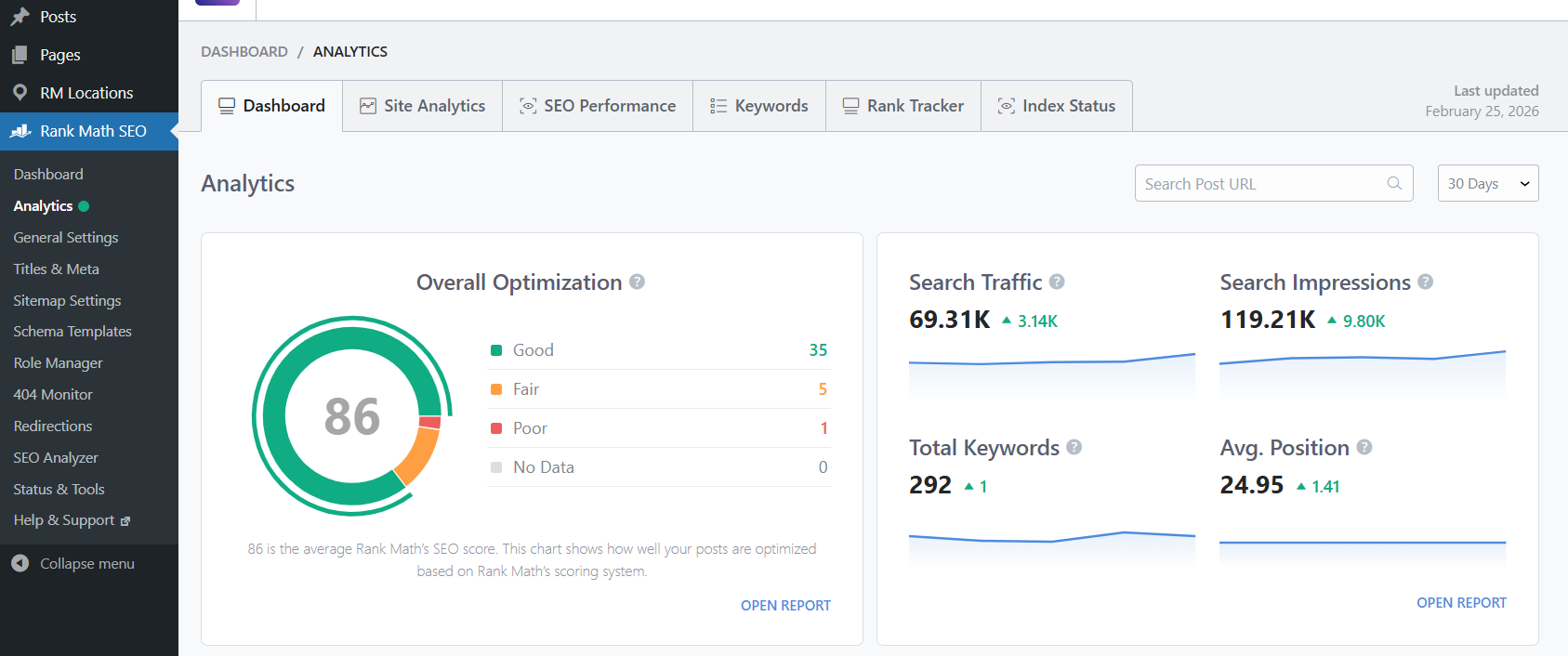
1. Site Analytics Dashboard
The Site Analytics tab offers a bird’s-eye view of your website’s performance.
- Centralized Metrics: View traffic, impressions, and click-through rates (CTR) in one place.
- Performance Comparison: Rank Math color-codes your data—green for gains and red for drops—allowing you to see if your 2026 optimizations are driving results compared to previous periods.
- Winning & Losing Posts: PRO identifies which pages have jumped in rankings and which have slipped, helping you prioritize where to focus your maintenance efforts.
2. The Index Status Report
Indexing issues are a “silent killer” for SEO. One of the most valuable PRO features is the Index Status report, which pulls data directly from Google’s URL Inspection API.
- Real-Time Visibility: See exactly which pages are indexed, when they were last crawled, and which ones are being blocked by noindex tags or robots.txt issues.
- Actionable Fixes: If a page is deindexed or fails to appear on Google, the report highlights the error. You can fix it and use the Instant Indexing button to request a re-crawl immediately.
3. Deep Keyword Insights
The Keywords section in PRO is a massive upgrade over the free version:
- Keyword Movement: Track how many keywords rank in the Top 3, Top 10, or Top 50 results and monitor your average position history for the trailing 12 months.
- Individual Post Performance: You can drill down into any single post to see every keyword it currently ranks for. This makes it easy to spot “accidental” keywords you can further optimize to capture even more traffic.
- AI Search Traffic Tracker (New for 2026): PRO analytics can now filter traffic coming from AI engines like ChatGPT and Perplexity, ensuring you stay ahead of the newest search trends.
Pro Advantages – Automation & Technical Edge
Beyond the main features, Rank Math PRO includes a suite of specialized tools designed to automate complex workflows. These features are built to scale with your site, ensuring that as your content grows, your technical SEO remains effortless.
1. Professional Redirection & 404 Management
The PRO version elevates standard redirects into a high-level management system:
- Scheduled Redirects: In 2026, timing is everything. You can set specific dates for a redirect to activate or deactivate—perfect for temporary Black Friday sales or seasonal landing pages.
- Bulk Management: For large sites, you can export all redirects to a CSV file, edit them in a spreadsheet, and re-import them in seconds.
- Regex & Categories: Use Regular Expressions (Regex) to create one rule that covers hundreds of URLs (e.g., redirecting an entire sub-folder structure) and organize them into categories like “Affiliate Links” or “Old Content” for easy filtering.
2. Enhanced WooCommerce & Image SEO
If you run an online store or a media-heavy site, PRO offers deep automation:
- Global Product Identifiers: Easily add GTIN, MPN, and ISBN data directly to your WooCommerce products—even for individual variations. This is a 2026 requirement for appearing in the Google Shopping carousel.
- Advanced Image Automation: PRO allows for complex “find and replace” rules. For example, it can automatically generate Alt Text using the file name or category, ensuring your entire media library is optimized for accessibility and Google Images without manual work.
- Watermarking: Automatically add your brand’s watermark to images when they are shared on social media, protecting your original content.
3. Custom Schema Builder & Import
While the free version offers templates, PRO gives you the Custom Schema Builder:
- The “Point & Click” Import: You can enter the URL of any webpage on the internet (like a competitor’s top-ranking post), and Rank Math will “read” its Schema.
- Modify & Save: You can then import that structure, tweak it for your own needs, and save it as a custom template. This gives you total control over how your data appears in search results without writing a single line of code.
4. Priority Support & Rapid Updates
Upgrading to PRO changes your relationship with the Rank Math team:
- 24/7 Priority Support: PRO users have access to a dedicated ticket system with significantly faster response times.
- Cutting-Edge Innovation: Rank Math is typically the first to integrate new Google technologies (like 2026’s latest AI search protocols). PRO users receive these updates first, often multiple times per month.
Ready to Upgrade?
If you have been enjoying Rank Math’s free features but are starting to feel limited by the Classic Editor meta box caps, upgrading to Rank Math PRO is the strategic next step. This version unlocks deeper analytics, unlimited focus keywords, advanced schema controls, and smarter automation—all designed to scale your SEO efforts with professional precision in 2026.
1. The Power of the SEO + Speed Bundle
Performance and SEO are two sides of the same coin. Rank Math offers a specialized SEO + Speed bundle that includes WP Rocket, one of the world’s most powerful caching plugins.
- Integrated Excellence: This bundle allows you to optimize your content with Rank Math while WP Rocket handles site speed, improves Core Web Vitals, and boosts your performance scores automatically.
- Exclusive Value: Purchasing them together is significantly more cost-effective than buying them separately, offering a “one-stop” solution for ranking and speed.
2. 2026 Winter Promotions and Bonuses
Rank Math is currently running a Winter Sale that “doubles the value” of your purchase.
- Benefit Multipliers: During this 2026 promotion, the standard 500 keyword tracking slots are doubled to 1,000, and the trial of Content AI credits is increased to 7,500.
- Partner Perks: A PRO upgrade grants access to a “Partner Rewards” package. This includes deep discounts on other premium tools like Imagify (image optimization), Divi, and exclusive high-performance hosting deals.
3. Choosing Your Path
Whether you are a solo blogger or managing a portfolio of sites, there is a tier for your specific scale:
- The PRO Plan ($7.99/mo): Ideal for individuals, supporting unlimited personal websites and 1,000 tracked keywords (limited time offer).
- Business & Agency Plans: Designed for those managing 100 to 500 client websites, including advanced white-label reporting and up to 75,000 tracked keywords.
The Ultimate Comparison – Rank Math Free vs. PRO
Deciding between the Free and PRO versions comes down to your growth goals. While Rank Math Free is widely considered the most powerful “no-cost” SEO plugin in existence, the PRO version is designed for those who want to turn their WordPress site into a data-driven ranking machine.
1. Why the Free Version Wins for Beginners
If you are just starting out, the free version provides everything you need to establish a solid foundation. You get the Classic Editor Meta Box, up to 5 focus keywords, Schema templates, and the 404 Monitor. For many solo bloggers, this “Swiss Army Knife” is more than enough to start ranking.
2. Why Professionals Leap to PRO
The PRO version is about Intelligence and Scale. It moves beyond basic “checklists” and gives you:
- The Keyword Tracker: Monitor your real-time position on Google for up to 500 keywords.
- Multi-Schema: The ability to “stack” rich snippets (e.g., Product + FAQ + Video) on a single page.
- Advanced Analytics: Deep integration with GA4 and Search Console data directly in your dashboard.
- Content AI: A personal SEO coach that helps you research and write based on current 2026 search trends.
3. Feature-at-a-Glance Comparison
Below is the definitive breakdown of how the versions stack up. Whether you need the simplicity of Free or the high-octane automation of PRO, this table will help you identify the right fit for your budget and business.
The Ultimate Showdown – Why Rank Math Outshines the Competition
In 2026, the WordPress SEO landscape is dominated by a few major players. However, Rank Math has consistently pulled ahead of legacy giants like Yoast SEO, All in One SEO (AIOSEO), and SEOPress. Here is a direct comparison of why professionals are making the switch.
1. Rank Math vs. Yoast SEO: The “Free” Revolution
Yoast is the oldest name in the game, but it has become synonymous with “paywalls.”
- The Keyword Gap: Yoast Free limits you to one focus keyword. Rank Math Free allows you to optimize for up to five keywords, giving you a massive advantage in capturing long-tail traffic.
+1 - Paid Features for Free: Rank Math includes a Redirect Manager and 404 Monitor in its free version. Yoast charges roughly $99/year for these exact same features.
- Performance: Yoast has nearly double the lines of code of Rank Math. In speed tests, Rank Math consistently loads faster, which is a direct ranking factor for Google’s Core Web Vitals.
2. Rank Math vs. All in One SEO (AIOSEO): Feature Density
AIOSEO is a solid choice for agencies, but it often feels “heavy” and expensive for individual users.
- Schema Superiority: AIOSEO’s advanced Schema is locked behind a high-tier subscription. Rank Math Free provides 18+ Schema types (like FAQ, How-To, and Recipe) at no cost.
- Dashboard Clutter: AIOSEO is known for heavy internal advertising. Rank Math offers a cleaner, modular interface where you can turn off the features you aren’t using to keep your dashboard lightning-fast.
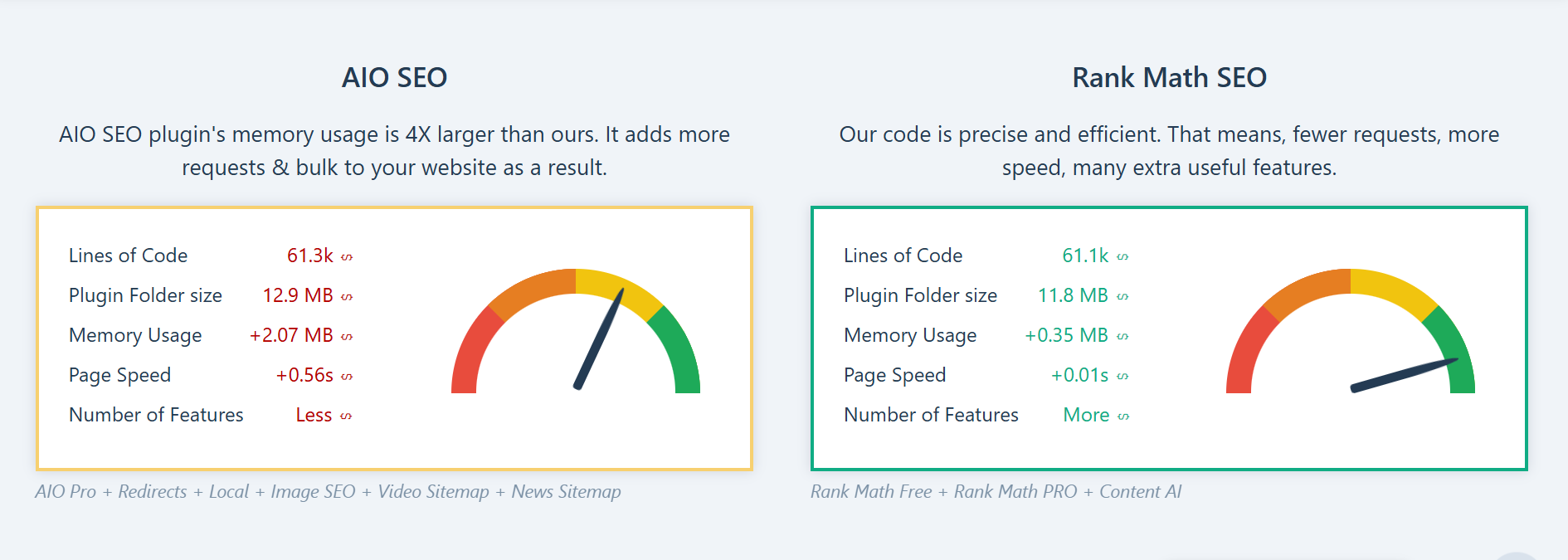
3. Rank Math vs. SEOPress: Intelligence vs. Simplicity
SEOPress is loved for being lightweight and ad-free, but it lacks the “proactive” intelligence of Rank Math.
- Built-in Analytics: Rank Math brings your Google Search Console data directly into your post editor. SEOPress requires you to leave your site to check your rankings.
- AI Integration: Rank Math’s Content AI (updated for 2026) acts as a live coach, telling you exactly what headings and keywords to use based on your competitors. SEOPress is more of a manual “toolset” rather than an active assistant.
Comparison at a Glance
| Feature | Rank Math (Free) | Yoast SEO (Free) | AIOSEO (Free) |
| Focus Keywords | Up to 5 | Only 1 | Only 1 |
| Redirect Manager | Included | Paid Upgrade | Paid Upgrade |
| 404 Monitor | Included | Missing | Missing |
| Internal Link Suggestions | Included | Paid Upgrade | Paid Upgrade |
| Google Search Console Integration | Included | Basic | Limited |
| AI Content Assistant | Available | Minimal | Basic |
Conclusion: Your Path to Search Mastery
You’ve now built a complete roadmap for your website’s success. From the initial setup of Rank Math to mastering advanced schema and AI-driven content, you have the exact same tools that top-tier SEO agencies use to dominate the search results.
The true strength of Rank Math is that it simplifies the complex. Instead of worrying about technical code, you can follow its clear, actionable checklists and focus on what matters most: creating great content for your readers.
As you move forward, remember that SEO is a marathon, not a sprint. Whether you stay with the powerful free version or scale up to PRO for deeper data, the key is consistency. Keep monitoring your analytics, refreshing your old posts, and staying curious about your audience’s needs.
Ready to take the first step?
Open your WordPress dashboard, run a final SEO Analysis, and aim to get your most important page to a score of 80 or higher. Your journey to the top of Google starts with that first optimization.